Creating an Edge Gateway
Access the Mediation Controller server's web interface with the URI /console.
Examples
If access to the Mediation Controller on its web IP address is 10.0.10.10, then access to the system interface will use the URL: [https://10.0.10.10/console].
Si l'accès au Mediation Controller est possible avec un nom DNS, par exemple cyberelements-cleanroom.domain.local, alors l'accès à l'interface system utilisera l'URL : https://cyberelements-cleanroom.domain.local/console.
Once logged in, follow the steps below depending on the type of Edge Gateway that needs to be created.
-
Open the Edge Gateway management module:
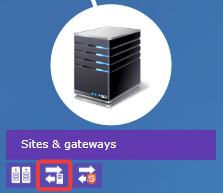
-
Create a new Edge Gateway by clicking on the + icon:
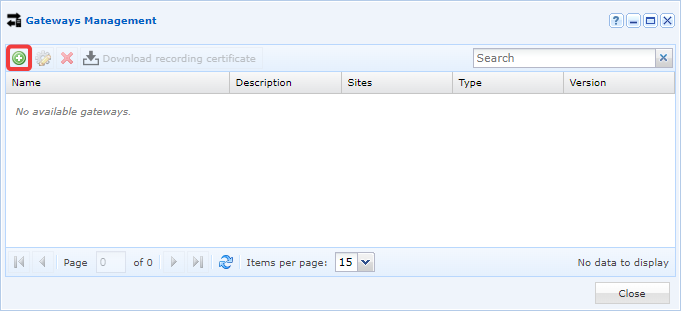
-
Fill in the various fields requested by the interface:
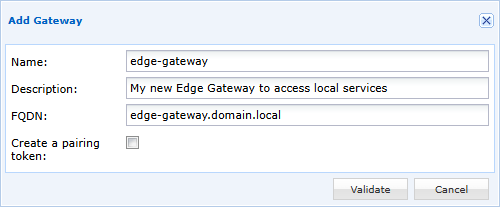
-
Name the new Edge Gateway.
- Optionally, enter a description to better identify it or understand its use.
-
Define the FQDN of the machine. This is important information that must match the CN of the certificate for the recording service.
-
Confirm the creation of the Edge Gateway.
-
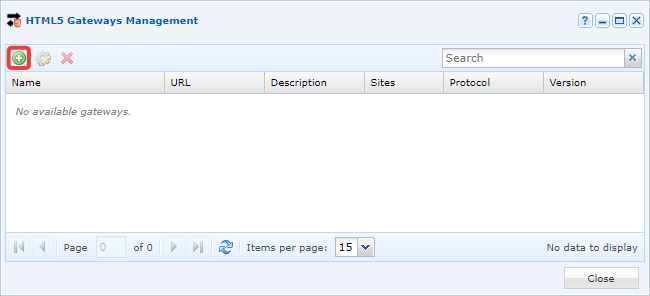
Open the HTML5 Gateways management module:
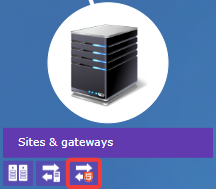
-
Create a new HTML5 Gateway by clicking on the + icon:
-
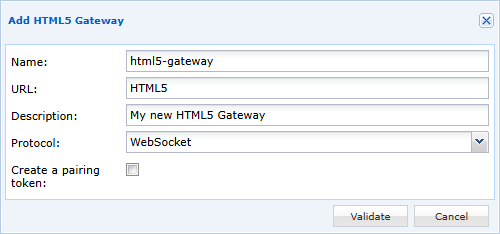
Fill in the various fields requested by the interface:
-
Name the new HTML5 Gateway.
- Specify the access URL (for a first instance in standalone architecture, this is commonly
HTML5; for a cluster, it isHTML5-1andHTML5-2). - Optionally, enter a description to better identify it or understand its use.
-
Set the protocol to
WebSocket. -
Confirm the creation of the HTML5 Gateway.