Viewing an organizational tree and its structures
An organizational tree is composed of several structures at different levels.
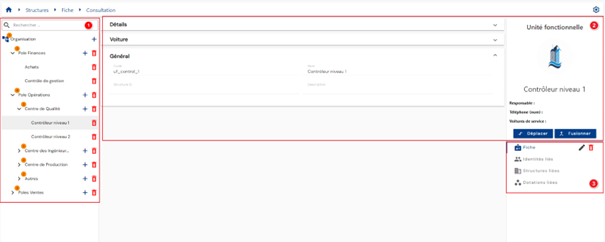
The organizational tree viewing page consists of the following elements:
- The organizational tree structure, composed of structures, is located on the left side of the screen. Each structure can be viewed individually by clicking on it.
- Details of a structure. In the main insert on the right, you will find the type of structure and its logo, in addition to the attributes defined to be displayed there. The attributes are displayed by category according to the criteria defined in the different types of forms.
-
Objects linked to the structure. A submenu for each type of object allows you to display the corresponding data. A structure can be linked to:
-
Identities: List of identities linked to the structure via an attribute (attribute configured in identity types). Information available for consultation only.
- Structures (other than through family relationship links): List of structures linked to the structure via an attribute (attribute configured in the structure types). Information available for consultation only.
- Allocations: List of allocations linked to the structure via an attribute (attribute configured in the allocation types). Information available for consultation only.
Note: Permission to view the details of a structure is granted based on the profile of the person connected. It is possible for a person to see the presence of a structure in the organizational tree on the left side of the screen but not have access to view its details. Contact the administrator for more information if necessary.
Actions on buttons in structure view mode:
 : see Modify a structure via the interface
- Move: see Move a structure via the interface
- Merge: see Merge a structure via the interface
 : see Delete a structure via the interface