Define managed identity statuses
Since version 7.0, there is no longer a default managed status list. It is necessary to define the managed statuses. A status is an integer with no character limit; you can manage as many digits as necessary.
However, two statuses are created by default in the application:
- 0: set by default if active_person is equal to 0.
- 1111: default status for a valid person.
These two statuses can be modified.
The identity status configuration page can be accessed via the “Configuration / Identity statuses” menu.
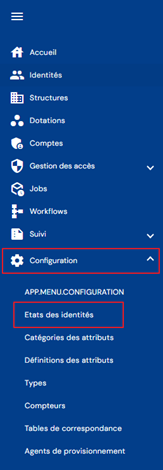
You will be taken directly to the list of existing identity statuses, preloaded in a table with no filters applied.
Pagination is implemented to display only 10 identity statuses.

A search field is available at the top right of the table. The search focuses on the codes or names of identity statuses.

To create a new identity status, click on the “ ” button.

First, enter the general parameters for an identity status:
- Code: identity status code. Must be unique and contain only numbers (integer type).
- Name: name of the identity status. Label that will be displayed in the various forms of the application. Mandatory.
- Description: field for entering a description of the status of identities. Optional.

To view and modify an identity status, click on the “ ” icon located to the right of the matching table row.

You can switch to edit mode directly from the identity status viewing page.

In edit mode, all fields can be modified.
Actions on buttons in edit or create mode:
- Cancel: cancels the current entry and returns to the list of person types page.
- Save: Validates the form and switches the page to view mode.
- Save and quit: Validate the form and return to the list of person types page.
To delete an identity status, click on the “ ” icon located to the right in the matching table row.

A confirmation message will appear before the identity status is deleted.
Warning: it is not possible to delete an identity status as long as identities have this status.