As part of a first-time installation
Installation of Systancia Identity (SID)
Cyberelements Identity is installed using the Installation.ps1 script included in the source directory.
The installation script steps are:
- Uninstall the old version (valid from version 7.0 onwards);
- Installation of the old application (silent execution of InstallShield);
- Installation of the new application and the Identity and Federation APIs;
- Mapping of sites to https ports.
Before running the script, edit the Installation.ps1 file located in the source directory.
Replace the values of the existing parameters and add the necessary parameters.
Required parameters:
- AccountSid: login for the SID service account (linked to the Identity API and new generation version 7 interfaces). This account must have sysadmin rights on the database instance.
- PasswordSid: password for the SID service account (linked to the Identity API and new generation version 7 interfaces).
- HostName: Full name of the server + domain (example: xxx).
- AccountHP: Hpliance service account login (linked to older generation version 6 interfaces).
- PasswordHP: Hpliance service account password (linked to older generation version 6 interfaces).
- DbIpAddress: Server and name of the database instance.
- LicencePath: Path where the licence.lic file is located.
Optional parameters:
- InstallPath: destination directory for installing Cyberelements Identity. If not specified, the default value “C:\Program Files (x86)\Systancia” is used.
- InstallPath64: destination directory for installation in the X64 directory of older applications. If not specified, the default value “C:\Program Files\Systancia” is used.
- CertName: Friendly name of the domain certificate. Optional if equal to HostName.
- AuditServer: IP address of the audit server. The default value is “127.0.0.1”.
- SmtpServer: IP address of the SMTP server. Empty by default.
- SmtpMail: destination email address. Empty by default.
Run the Installation.ps1 script with an administrator account.
Modify the following parameters in the [Hpliance][dbo][CONFIGURATION] table by replacing the IP address with the full name of the server (equivalent to the HostName parameter):
- API_URL: https://[HostName]:44345
- IDP_URL: https://[HostName]:44350
- WEB_URL: https://[HostName]:44340
If the script was executed without error, open the IIS Manager and select the “Sites” directory.
Select the Systancia.Federation site and click on the URL to display the login page.
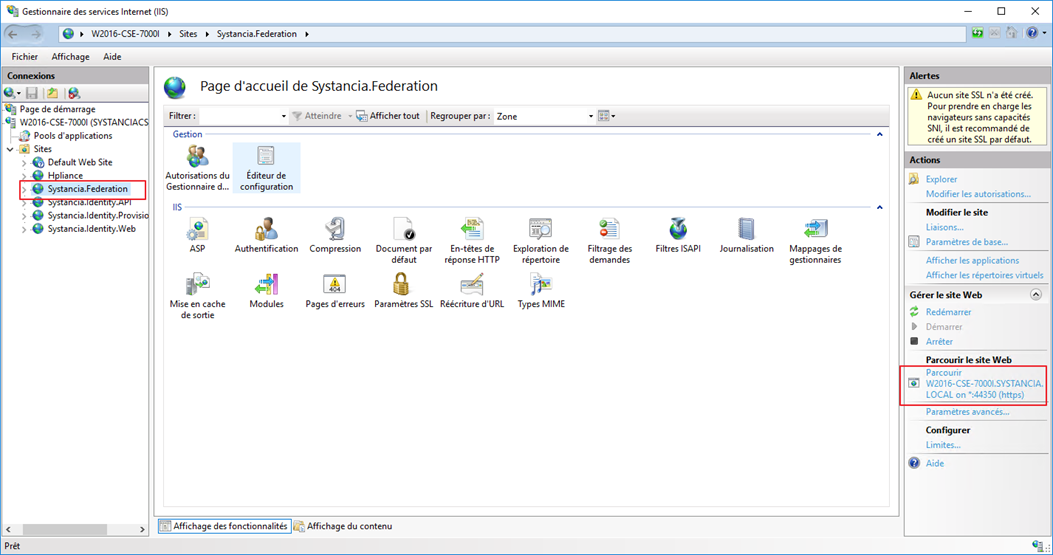
This operation completes the installation of the Federation part by creating the database.
If the login page opens, the installation is complete and no errors were encountered.
If the certificate name is different from the server name, the Systancia.Federation site will generate an error when opened.
In this case, manual changes must be made to the Systancia.Federation database.
Execute the following queries:
1 2 3 4 5 | |
Installation of the Identity provisioning engine (SIP)
The Cyberelements Identity Provisioning Engine (SIP) is installed using the SipSetup.ps1 script included in the source directory.
The command line to be executed can be found in the README.txt file in the source directory.
Replace the values of the following parameters:
- InstallPath: destination directory for the Cyberelements Identity installation
- AccountService: SIP service account login (linked to the API).
- AccountPassword: SIP service account password (linked to the API).
- Authority: Replace [AuthorityServ] in the URL with the full name of the SIP server domain certificate
- Certificate: Friendly name of the domain certificate
- HostName: Full name of the server + domain (example: xxx)
- ApiUrl: Replace [SidApiServer] in the URL with the full name of the SID server domain certificate (Identity API)
Run the script with an administrator account.
Write permissions in the SIP directories are only given by default to the SIP service account. You can manually add these rights to other accounts if you wish (for example, the service account on which the old interfaces run if you execute workflows with tasks that call scripts containing provisioning sequence calls).
As a best practice, all calls to provisioning sequences must go through web services so that only the SIP service account executes them.