Managing a workflow
This feature allows a connected user who is a workflow administrator to access a workflow instance at any time to check its status, restart it, pause it, or stop it.
To access the workflow administration page in the workflow operating console, you must navigate to the “Workflow Administration” tab.
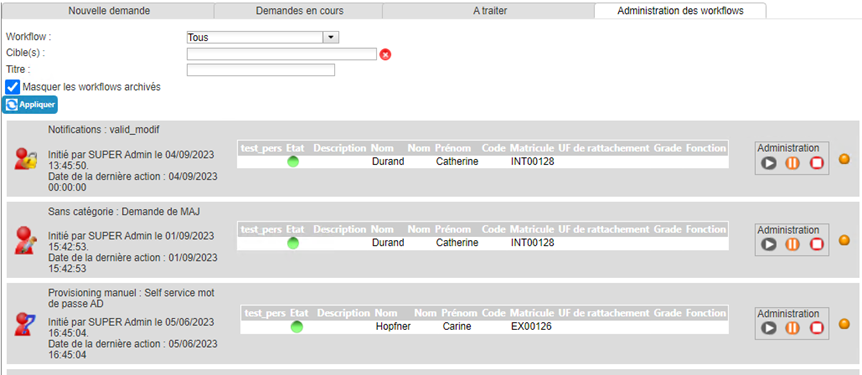
Click on a workflow to view its details:
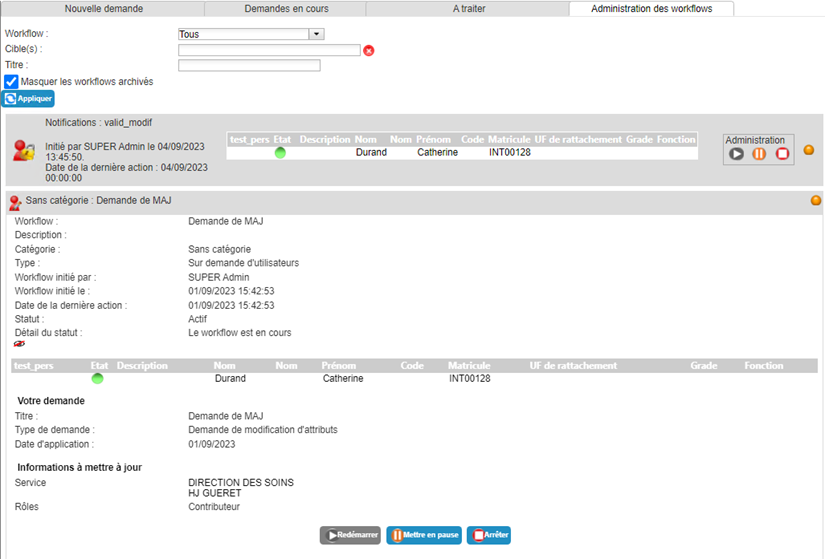
The administration page allows you to:
- Pausing a workflow
- Restart a workflow
- Stop a workflow
- Viewing the progress of a workflow
Pausing a workflow
From the workflow details screen, click on the “Pause” button. This means that during the pause period, no one will be able to take any action on it (for example: no validation of the current step).
Restart a workflow
From the workflow details screen, click the “Restart” button. This button is only available for workflows that are paused. It allows you to restart the workflow at the step where it was paused.
Stop a workflow
From the workflow details screen, click the “Stop” button. The workflow will then take on the Archived status and will be stopped at the stage it was at before being stopped.