Create/Modify export rules
The purpose of an export rule is to define, based on a repository, the objects to be exported and their locations. For example, for a directory-type repository, you will need to define the objects to be exported and the OUs in which the search will be performed.
Each export will generate a data file in XML format.
There are two possible export modes, which can be selected depending on the use case:
- Complete: all objects that comply with the export rules are exported to the output file. The output file is in XML format.
- Unitary: Export of a single object filtered on the value of an attribute.
The export rules to be configured differ depending on the type of repository.
Exporting a directory-type repository (LDAP, AD, AD/LDS, OpenLDAP, etc.)
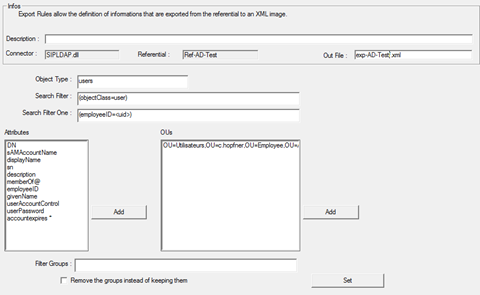
- Object type: specify the type of object to be exported (e.g., user, classes, etc.).
- Search filter: optional field for applying filters to the objects to be exported (e.g., “employeeID” not empty).
- Single filter: attribute that allows you to filter an object by defining its value.
- Attributes: list of attributes of the objects to be exported.
- OUs: specify the OUs to which the objects will be exported.
- Group filters: List of groups to manage or exclude in deletion actions:
- If the “Remove the groups instead of keeping them” option is not checked: the list of groups indicates those that should not be deleted.
- If the “Remove the groups instead of keeping them” option is checked: the list of groups indicates those that can be deleted.
Results and options:
Each attribute is exported in an XML tag with the name of the directory attribute as its name. The default format of the exported data is a character string.
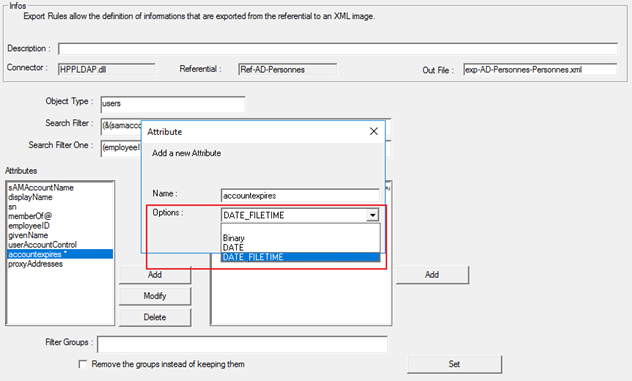
For each attribute, it is possible to specify a different type with the following choices:
- Binary
- Date
- Date_Filetime
To change the export format, select the desired attribute and click on the “Modify” button.
Exporting a flat file repository (CSV)
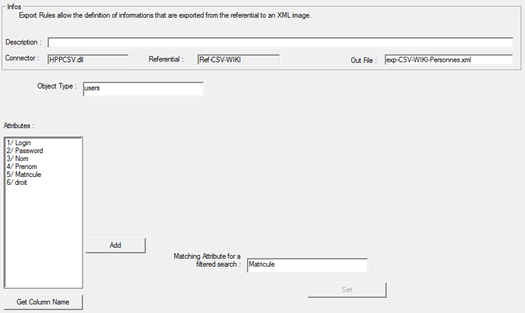
- Attributes: list of columns comprising the flat file (the file is defined when the repository is created).
- Click on “Add” to add an entry.
- Select an attribute to modify or delete it.
- If the CSV file has column headers, you can click on the “Get Column Name” button to automatically retrieve the column names.
- Comparison attribute for a filtered search: column that allows you to export a single object by defining its value.
Results and options:
Each attribute is exported in an XML tag with the specified attribute name as its name. The default format of the exported data is a character string.
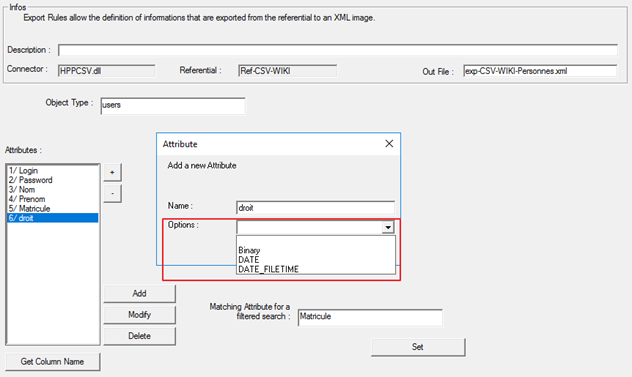
For each attribute, it is possible to specify a different type with the following choices:
- Binary
- Date
- Date_Filetime
To change the export format, select the desired attribute and click on the “Modify” button.
Exporting a database-type repository (SQL Server, Oracle, etc.)
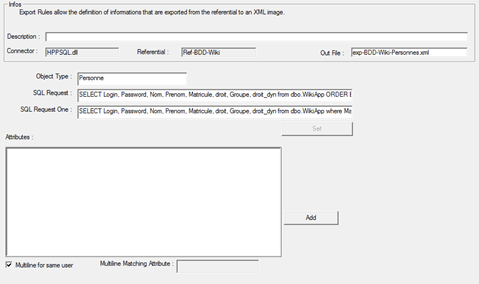
- Object type: indicative value, no impact on configuration
- SQL query: query that extracts all the desired information
- Unitary filter: query in which a filter is specified to return only one result
- Attributes: box provided for adding SQL queries to export additional information. Each query can only export a single attribute, but it can be multi-valued (queries returning multiple lines)
- Multi-line option: option to check if one of the exported attributes of the main query is multi-valued. The name of this attribute must be noted in the “Multiline Matching Attribute” field. There can only be one multi-valued attribute in the main query.
Important note: if this option is checked, it is essential to perform an “order by” in the query to sort using the attribute entered in the “Multiline Matching Attribute” field.
Results and options:
Each column defined in the query is exported in an XML tag with the name of the specified column. The format of the exported data is a character string.
Exporting an API-type repository (REST – SIM protocol)
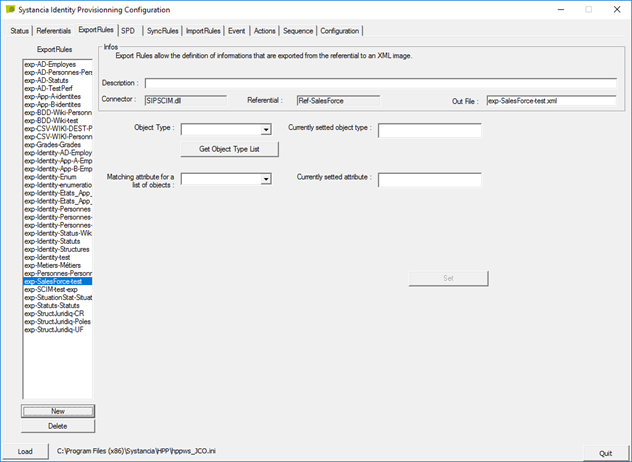
- Object type: click on the “Get Object Type List” button to retrieve the list of objects available for export from the application repository.
- Mapping attribute: click on the “Get Attributes List” button to retrieve the list of available attributes. The list of attributes depends on the type of object selected.
- Click on the “Set” button to confirm the updates.
Results and options:
Each attribute defined in the object type returned by the API is exported in an XML tag. The format of the exported data is a character string.
Exporting an XML repository
To export an XML repository, you need to perform an XSLT action.
XML files can have different structures, so you need to produce a transformation file to convert it to an XML format compatible with the SIP provisioning engine.
Identity Export: identities
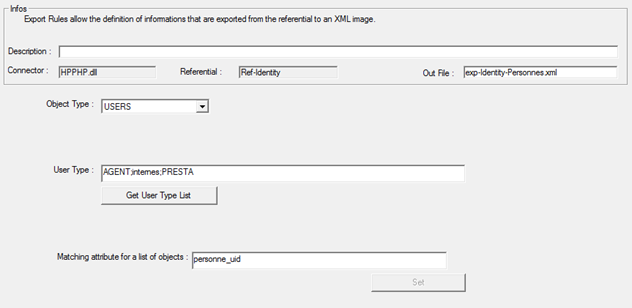
- Object type: Enter the value “USERS”
- Person type: specify the code for the types of persons to be exported from the Identity repository
- Comparison attribute for unit export: ‘personne_uid’
Results and options:
For each identity, all attributes that have a value are automatically exported to an XML tag with the attribute code as its name. The format of the exported data is a character string.
Identity export: Enumerations
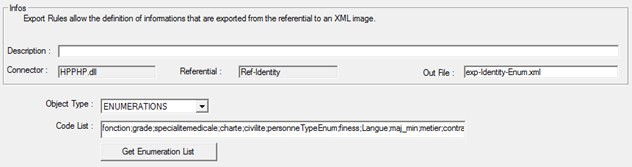
- Object type: Enter the value “ENUMERATIONS”
- List of Codes: Code of the enumerations to be exported from the Identity repository; several enumerations can be exported at the same time.
No single exports are managed for enumerations.
Results and options:
For each enumeration, the following tags are exported:
- Type = Attribute code (or enumeration type code) containing the list of values
- Code = Code of an enumeration value
- Name = Label associated with the code
- Description = Description of the enumeration value. This information is optional and is only exported if it is not empty.
The format of the exported data is a character string.
Identity export: Cross-reference tables
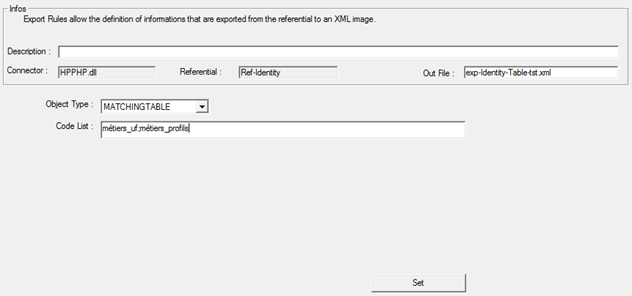
- Object type: Enter the value “MATCHINGTABLE”
- List of Codes: Code of the matching tables to be exported from the Identity repository; several matching tables can be exported at the same time.
No single exports are managed on matching tables.
Results and options:
For each matching table, the following tags are exported:
- Type = Code for the matching table type
- Key = Key for the matching table
- Value = Value(s) associated with the key. The value can be multi-valued.
- Description = Description of the cross-reference table value. This information is optional and is only exported if it is not empty.
The format of the exported data is a character string.
Identity export: allocations (resources)
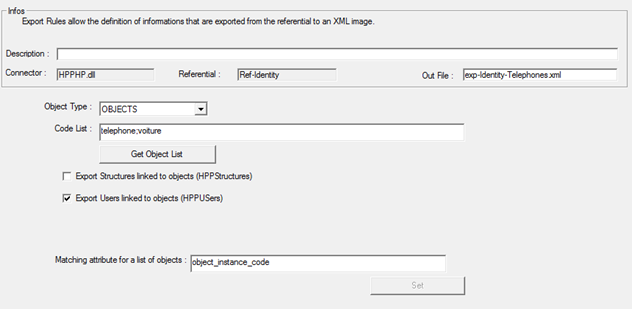
- Object type: Enter the value “OBJECTS”
- Code list: specify the code for the types of allocations (resources) to be exported from the Identity repository
- Option to export structures that have a link to the allocation
- Option to export identities that have a link to the allocation
- Comparison attribute for unit export: ‘object_instance_code’
Results and options:
For each allocation (resource), all attributes that have a value are automatically exported to an XML tag with the attribute code as its name. The format of the exported data is a character string.
Identity export: provisioning states
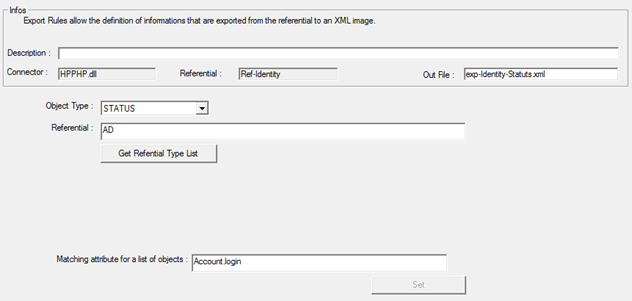
- Object type: Enter the value “STATUS”
- Repository: code of the repository from which you want to export persons and their associated accounts. Please note that it must be unique in order to function properly.
- Comparison attribute for unit export: “Account.login”
Results and options:
For each account in the repository, the following tags are exported:
- Account.Id: Id of the account
- Account.login: Login of the account. Will be used for comparison purposes
- Account.state: Account provisioning status (0: not provisioned, 1: provisioned)
- Person.Id: Primary person ID
- Person.uniqueId: Primary person UID
- For each authorization linked to the account:
- [code_mapping_right]#right.id: information tag to retrieve the list of IDs for rights that have the mapping code value indicated in the first part of the tag. Multiple values are possible.
- [code_mapping_right]#[right.id]: A tag of this type for each authorization that has the mapping code value indicated in the first part of the tag. Contains the authorization value
- [code_mapping_right]: information tag to retrieve the list of authorization values that have the mapping code value indicated in the first part of the tag. Multiple values are possible.
- [code_mapping_right]#state: List of provisioning states for each authorization that has the mapping code value indicated in the first part of the tag.
The format of the exported data is a character string.
Identity Export: structures
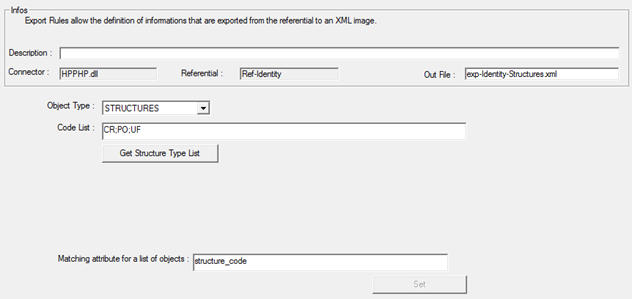
- Object type: Enter the value “STRUCTURES”
- Code list: specify the code for the types of structures to be exported from the Identity repository
- Comparison attribute for unit export: ‘structure_code’
Results and options:
For each structure, all attributes that have a value are automatically exported to an XML tag with the attribute code as its name. The format of the exported data is a character string.
Identity export: identities + authorizations
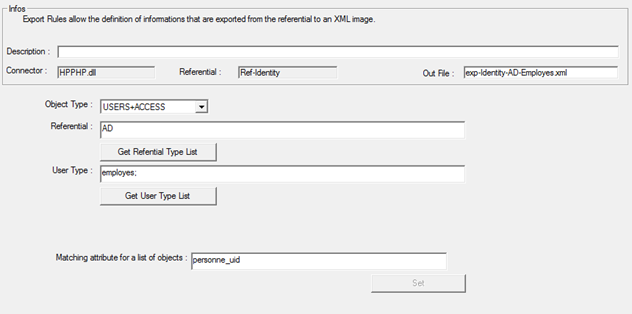
- Object type: Enter the value “USERS+ACCESS”
- Repository: code of the repository from which you want to export persons and their associated accounts. Please note that it must be unique in order to function properly.
- Person type: specify the code for the types of persons to be exported from the Identity repository
- Comparison attribute for unit export: ‘personne_uid’
Results and options:
For each identity, all attributes that have a value are automatically exported to an XML tag with the attribute code as its name. The format of the exported data is a character string.
If the identity has an account in the specified repository, then additional XML tags are exported:
- HPPAccountLogin
- HPPAccountPwd
- HPPAccountState
If the identity has permissions on the specified repository, additional XML tags are exported:
- HPPAccessRight, which will contain all values for “Group” and “Dynamic Group” permissions
- One XML tag for each different code defined in the mapping of “Attribute” or “Dynamic Attribute” permissions. If several authorizations are configured with the same mapping code, then a single XML tag will be exported with several values inside.
Identity export: accounts + authorizations
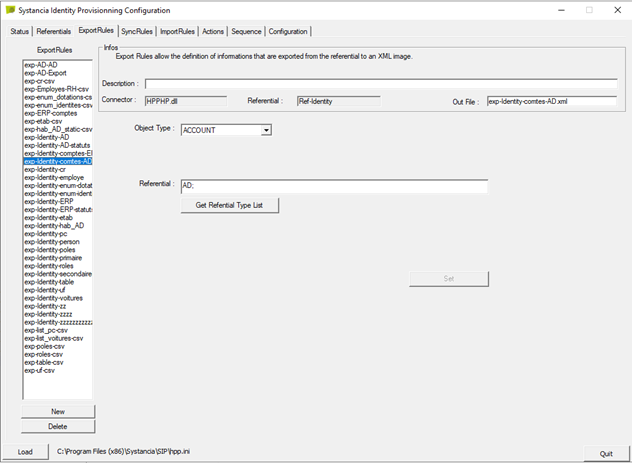
- Object type: select the “ACCOUNT” value
- Repository: specify the code of the repository from which the accounts and authorizations are to be exported. Please note that even though it is technically possible to enter multiple repository codes, it is essential to enter only one for the provisioning connector to function properly.
Results and options: All accounts in the selected repository are exported.
For each account, the following tags are exported:
- ID = Account ID, to be used for updates and deletions
- Account_login = Account login
- password = Account password, exported in encrypted form
- Account_provisioning = Account provisioning status:
- 1: theoretical account only
- 2: orphan account
- 3: theoretical and provisioned account
- Account_state = Theoretical account status
- -1: No account (value not possible in export)
- 0: theoretical account only
- 1: active account
- 2: disabled account
- Account_type = Account type ID
- roles = Roles associated with the account
- Attributes and permissions are exported in tags named by the configuration.
Identity export: roles
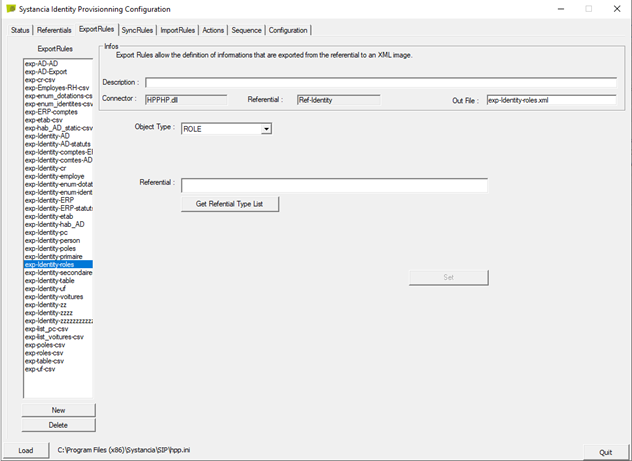
- Object type: select the value “ROLE”
- Repositories: specify the codes of the repository whose existing related roles are to be exported. Optional.
Results and options: All existing roles are exported. If one or more repositories are specified, then only roles related to those repositories will be exported.
For each role, the following tags are exported:
- id = ID of the role
- code = the code of the role
- name = the name of the role
- description = the description of the role
- repositories = code of the repositories linked to the role
- accountTypes = code of the account types linked to the role
Identity Export: authorizations
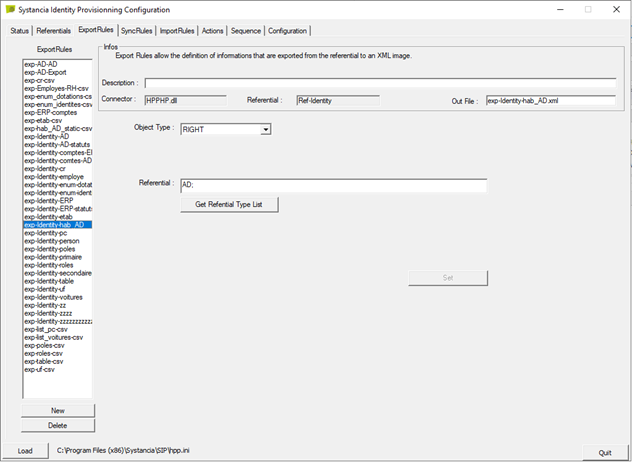
- Object type: select the value “RIGHT”
- Repositories: specify the codes of the repository whose existing related authorizations must be exported. Optional.
Results and options: All existing authorizations are exported. If one or more specific repositories are specified, then only authorizations related to those repositories will be exported.
For each authorization, the following tags are exported:
- Id = The authorization ID
- code = The authorization code
- name = The authorization name
- category = The authorization category code
- application = The authorization application code
- repository = The authorization repository code
- type = The authorization type
- 3 = group. Please note that the use of this type of authorization is deprecated as of version 7.0. Prefer the “attribute” type.
- 6 = attribute
- mode = The mode of authorization
- 0 = Static. Static value to be specified in the “value” tag
- 1 = dynamic: value of an attribute specified in the tag named “template#[object_type_code]”
- The name of the attribute for exporting authorizations linked to accounts or persons in the “mappingCode” tag
Identity export: identities + roles
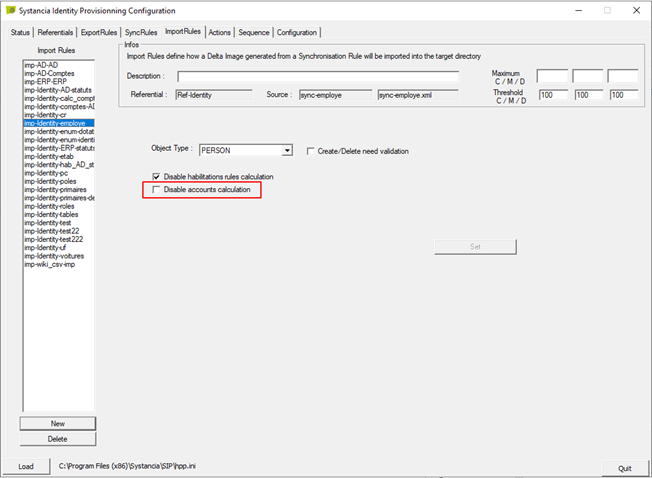
- Object type: select the value “PERSON_ROLES”
- Repositories: specify the codes of the repository whose existing related roles are to be exported.
Results and options: all identity-role links related to the selected repositories are exported.
For each identity-role link, the following tags are exported:
- person = UID of the identity
- role = code of the role to be assigned
- startdate = start date of the role
- enddate = end date of the role
- id = id of the identity-role link
Identity export: identities + roles + authorizations
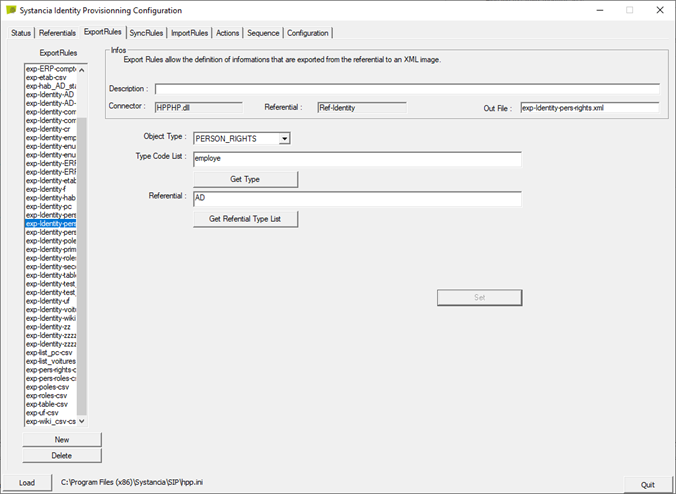
- Object type: select the value “PERSON_RIGHTS”
- Repositories: specify the repository codes for which you want to create identity/role-authorization links.
Results and options: all identity/role-authorization links related to the selected repositories are exported.
For each identity/role-authorization link, the following tags are exported:
- person = UID of the identity
- role = role code
- right = authorization code
- startdate = authorization start date
- enddate = authorization end date
- id = id of the identity-role-authorization link