Create/Modify actions
An action is used to perform operations related to exports, synchronizations, and imports, such as executing batch or PowerShell files.
There are three types of actions supported:
- COPY: copy a file to a target location
- EXE: launch an executable with arguments
- XSLT: convert a text file to XML or vice versa.
COPY action
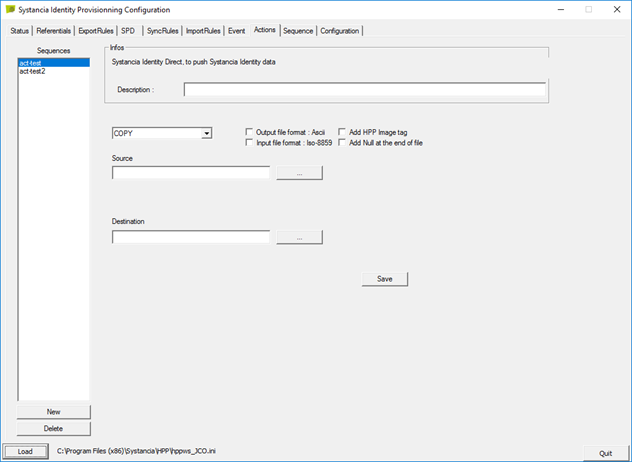
- Source: Select the source file to copy
- Destination: Select the location and name of the destination file.
Click the “Save” button to save the settings.
EXE action
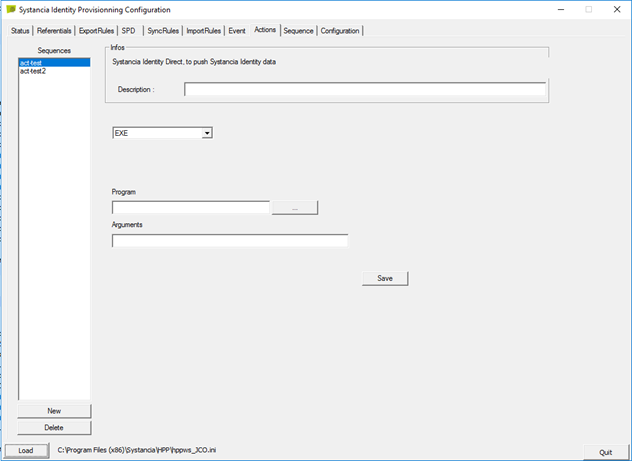
- Program: Select the location and name of the program to run, for example PowerShell.exe
- Arguments: Specify the arguments to be applied when executing the program. For example, an ID to perform an operation on a specific object.
Click the “Save” button to save the settings.
XSLT action
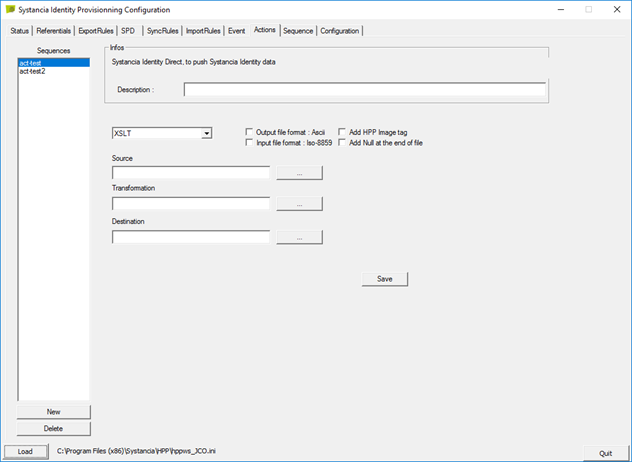
- Source: Specify the path of the file(s) to which a transformation will be applied. It is possible to use “*” in the file names at the beginning, end, or middle of the string.
- Transformation: Specify the path of the file with the “.xlst” extension that will perform the transformation.
- Destination: Specify the path to the destination file.
Click the “Save” button to save the settings.
This action allows you to convert an XML file to another format or vice versa.
It is possible to have multiple input files, each of which will be converted, but they will be concatenated into a single output file.