Client computer
When using the Cleanroom agent, logs are accessible on the user's workstation:
cyberelements Cleanroom/cyberelements.io client log:
- Location:
%LOCALAPPDATA%\\Systancia\\IpdivaPlugin\\Organisation\\Logs - Information about the client's connection to the Mediation Controller server and the launch of resources.
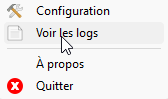
You can access the client logs directly by right-clicking on the client icon in the system tray and selecting “View logs” from the menu:
VPN client log cyberelements Cleanroom/cyberelements.io:
- Location:
C:\\Windows\\Temp\\IPdiva\\AdminDaemon\\VPN - Information about the client's connection to the Mediation Controller server and the launch of the VPN resource.