Viewing an allocation
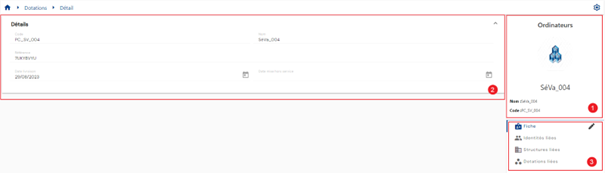
The allocation viewing page consists of the following elements:
- Allocation header. It consists of the icon that defines the allocation type. This image is surrounded by the color that defines the allocation type. The name of the allocation type is specified above the icon. The information displayed in this box below the image is configured by the administrator. By default, the following attributes are displayed:
- Name
- Code
- Each category comprising the allocation is displayed in a separate block with the attributes linked to the category, according to the configurations and authorizations of the person connected. It is possible to hide or display the attributes of a category by clicking on the category header.
- Several tabs are available to view additional information related to the identity:
- Record
- Related identities
- Related structures
- Related allocations
The display of information in the allocation record is subject to the permissions of the connected user, so it may differ depending on the profile.
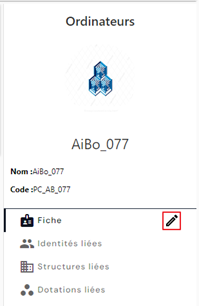
You can switch to edit mode by clicking on the “ ” icon located to the right of the Record submenu.
View identities, structures, and allocations linked to an allocation
Allocations are often linked to identities or structures. However, they can also be linked to another allocation.
To view objects linked to an allocation, use the “Linked identities,” “Linked structures,” and “Linked allocations” submenus.
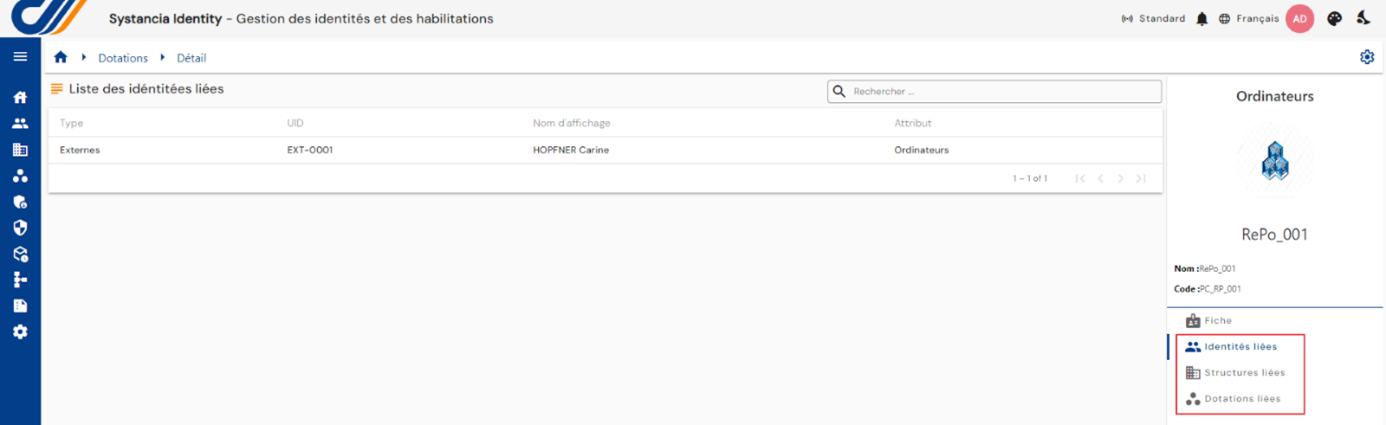
A allocation can technically be linked to several objects (structures and identities).
Links can be modified directly in the objects.
For example, if an allocation is linked to identity A, then the link must be deleted in the Identity A record.