Restart pairing of the Edge Gateway Windows
Prerequisites
To perform the following operations, you must have administrator rights on the machine.
In addition, it is necessary to have a pairing token for the Edge Gateway.
If you need to re-pair the main Windows Edge Gateway instance, follow these steps:
-
Run the
<INSTALLDIR>\IPdiva\IPdivaGateway\Pair-gateway\pair-gateway.exeexecutable as an administrator. The default installation directory is as follows:1"C:\Program Files (x86)\Systancia\IPdiva\IPdivaGateway\Pair-gateway\pair-gateway.exe" -
Configure the pairing tool:
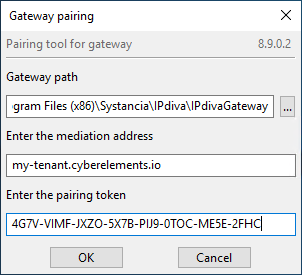
- Change the Windows Edge Gateway directory if it was not installed in the default directory
- Enter the cyberelements.io tenant name or the DNS name or web IP address of your cyberelements Cleanroom platform
- Enter the pairing token
- Validate the configuration
-
A message will inform you whether the pairing was successful or not