Create/Modify import rules
An import rule writes the actions (creation, modification, deletion) to be performed that are found in the DELTA image.
Security thresholds must be defined for imports to be performed. These thresholds also allow potential errors to be raised and therefore writes to be blocked. An import blocked by thresholds can be viewed and action can be taken to validate or reject the import.
Depending on the type of target repository, the import rules to be configured are different.
Importing data into a directory-type repository (LDAP, AD, AD/LDS, OpenLDAP, etc.)
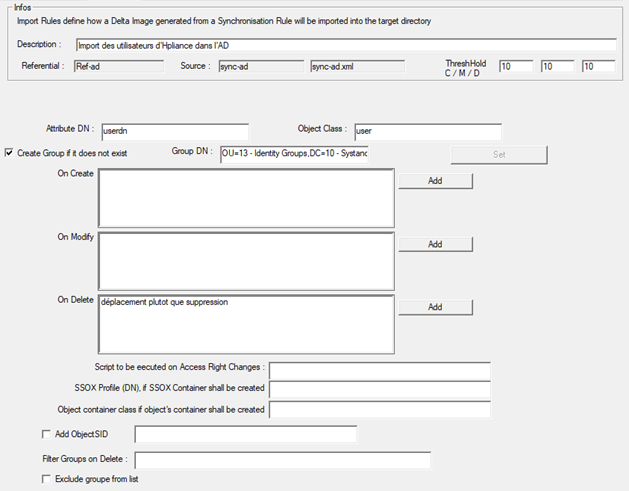
- DN attribute: specify the name of the mapping attribute that contains the DN (Distinguished Name) information
- Object class: define the type of object to be created/modified/deleted. Only one object type is possible per import.
- Option to create a security group if it does not exist: this option can be enabled if necessary (it is possible that the security groups do not exist at the time of provisioning).
- Specify the destination OU for the security groups. Please note that only one OU can be specified, so all groups will be created in the same location.
- Option to add operations to be performed after a creation or modification action or in the event of deletion. (Example, move an object to another OU in the event of deletion)
- Possible operations on creations/modifications/deletions:
- EXEC: will be executed after the creation/modification/deletion action
- Possible operations on deletions:
- DELETE: by default, objects are not actually deleted from the directory. To physically delete the object, the DELETE operation must be added.
- MOVE: Allows the object to be moved to another OU. The destination OU must be specified in the expression.
- MOVESUB: Allows the child objects of the object being evaluated to be moved to another OU. The destination OU must be specified in the expression.
- Possible operations on creations/modifications/deletions:
- Options for a connector with the Systancia Access solution:
- Script to be executed when an access is modified
- Access profile (DN) to be specified if the option to create a container is enabled
- The type of object to be created in the container if the option to create a container is enabled
- Add SID object
- Filters for groups to be managed or excluded in deletion actions:
- If the “Exclude group from list” option is checked: the list of groups indicates those that should not be deleted
- If the “Exclude group from list” option is not checked: the list of groups indicates those that can be deleted
Import data into a flat file repository (CSV)
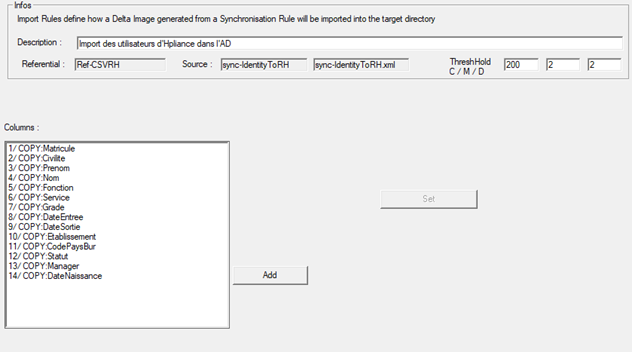
- Columns: list of attributes to be added to the destination file. You must use the COPY operation to add the attribute value to the file column. The column and multivalue separator is defined in the repository.
Import data into a database repository (SQL Server, Oracle, etc.)
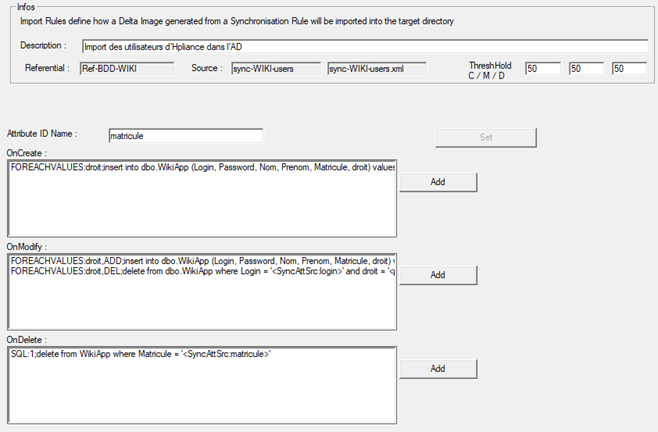
For each action (Creation, Modification, and Deletion), it is possible to define one or more commands to be performed in the destination database.
For each command, one of the following operations must be defined:
- EXEC: allows you to launch an execution command (batch, PowerShell, etc.)
- FOREACH: allows you to perform a query on several attributes.
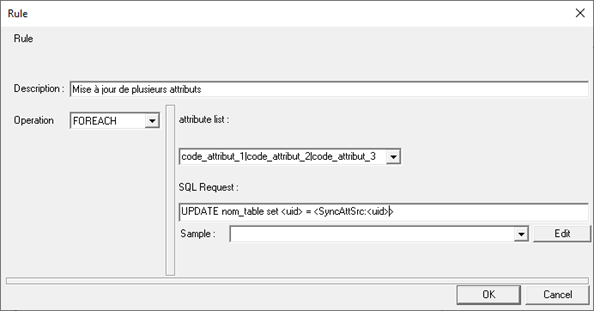
- List of attributes: specify the attribute codes to be updated. Please note that the codes must correspond to both the name of the column in the destination database and the attribute name in the DELTA file. Each attribute must be separated by the character ‘|’.
- SQL query: query to be applied to each attribute defined in the list. Use the string <uid>, which will be replaced by the attribute names.
- FOREACHVALUES: allows you to manage a multi-valued attribute by creating/modifying as many lines as there are values contained in the attribute.
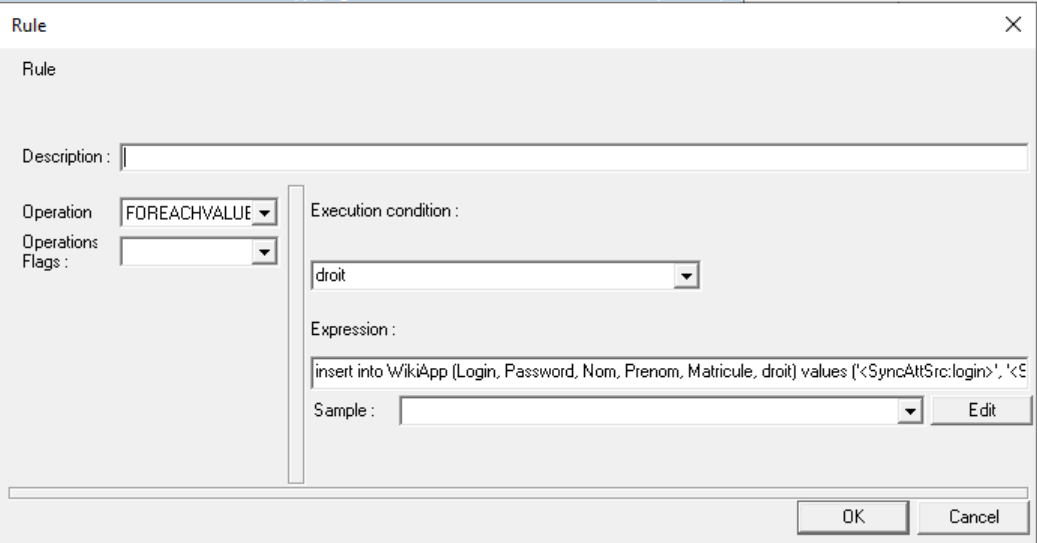
- The execution condition is mandatory and must contain the name of the multivalued attribute (of the destination repository) on which a loop will be performed.
- The expression is mandatory and must contain the query to be executed. The multi-valued attribute on which the loop is performed (specified in the execution condition) must be replaced in the query with the string “<param:uid_value>”.
Query example:
1 2 3 4 5 6 | |
In the example, if the attribute contains 3 values, then 3 lines will be created. The login, password, nom, prenom and matricule attributes will have identical values. The right attribute will have a different value in each line.
Please note that only one multivalued attribute can be defined per operation.
- SELECT: Allows you to retrieve additional values to enhance the current object.
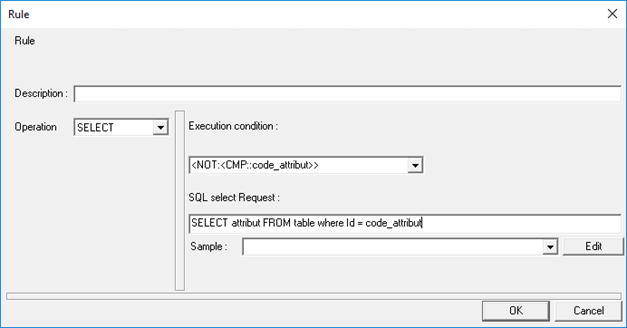
- The execution condition is mandatory. It can contain a formula that returns 0 if false or 1 if true. You must enter 1 if you do not want to set a condition.
- SQL query: SELECT type query is mandatory. The attributes selected in the query will be automatically added to the current object with the query results as values.
- SQL. Allows you to execute an UPDATE or DELETE query by specifying an execution condition.
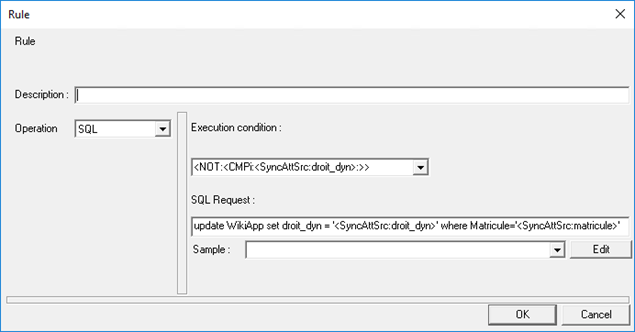
- The execution condition is mandatory. It can contain a formula that returns 0 if false or 1 if true. You must enter 1 if you do not want to set a condition.
- SQL query: UPDATE or DELETE query. The attributes present in the delta must be passed with the keyword <syncattrsrc>.
Import data into Systancia Identity
- Type of object to import: specify the type of import from the following list:
- ACCOUNT: only allows updates to existing account attributes in Identity.
- ENUM_ACCOUNT: to import enumeration values for account-type attributes.
- ENUM_PERSON: to import enumeration values for identity-type attributes.
- ENUM_RESOURCE: to import enumeration values for allocation-type attributes.
- ENUM_STRUCTURE: to import enumeration values for structure-type attributes.
- MATCHINGTABLE: to import values into matching tables.
- PERSON: to import identities.
- PERSONACCESS: not supported for import.
- RESOURCE: to import allocations.
- RIGHT: to import authorizations.
- ROLE: to import roles.
- STATUS: to import account, role, or authorization provisioning statuses.
- Specify the repository. Must be unique.
- STRUCTURE: to import structures.
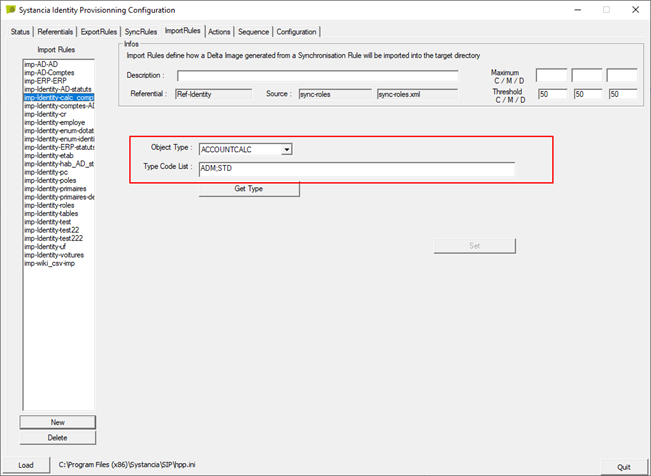
- HABILITATIONCALC: allows you to launch a mass recalculation of authorization and SoD rules for everyone.
- PERSON_ROLES: to import identity-role links.
- PERSON_RIGHTS: to import identity-role-authorization links.
- ACCOUNTCALC: allows you to recalculate the accounts in the affected repository.
When importing objects such as identities, structures, or allocations, there is an option to disable the calculation of authorization and SoD rules on the fly. You must check the box on all upstream provisioning connectors affected by daily synchronization to disable calculations.
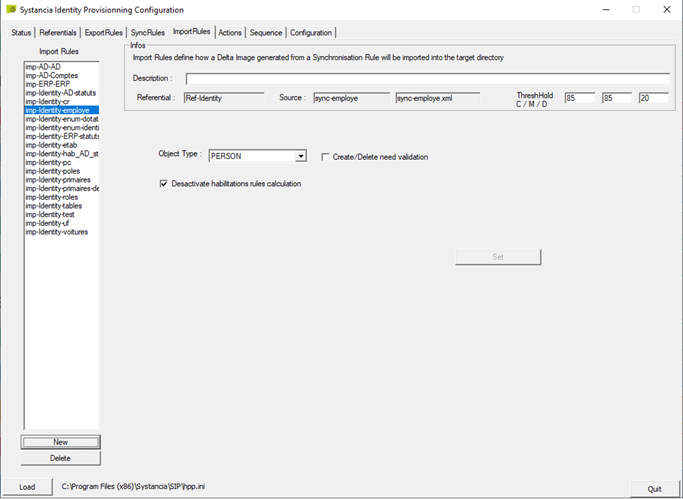
If this option has been checked, you will need to launch an import to recalculate the rules at the end of the upstream provisioning connectors in order to launch the batch calculation.
Disable account calculations
Since SP3 of cyberelements Identity 7.0, a new option is available in upstream connector imports for persons, structures, allocations, and authorization rules.
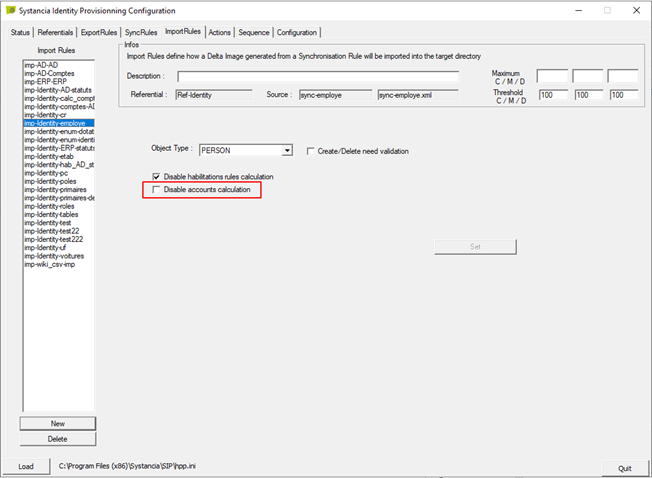
This option allows you to disable on-the-fly account calculations when creating, modifying, or deleting objects that may have an impact on accounts.
It is recommended that you check this option if there are large volumes to be processed by the provisioning sequence.
If you check this option, you must run an import to calculate the account types specified in the configuration at the end of imports in cyberelements Identity in order to have correct data.