Workflow settings¶
A workflow template is defined by:
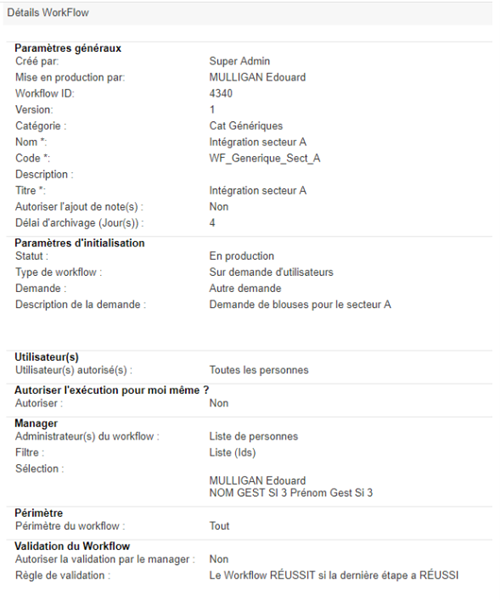
- Its general settings,
- Its initialization settings,
- Its actual or system users authorized to start it,
- An execution authorization on the requester,
- Its managers,
- Its scope: Target persons for the workflow (e.g., internal, persons in a department),
- Its validation rule, which depends on the status of the steps,
- Its steps,
- Its actions and tasks.
General settings¶
| Parameter | Description | Type and possible values |
|---|---|---|
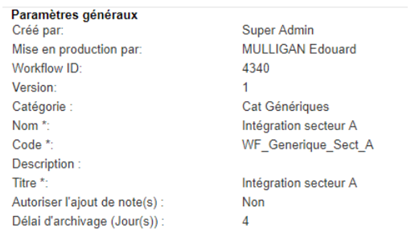
| Created by | Display name of the workflow template creator. |
Visible only in view mode. Not editable. |
| Put into production by | Display name of the identity that put the workflow into production. |
Visible only in view mode. Not editable. |
| Workflow ID | Unique identifier assigned by cyberelements Identity. |
Visible only in view mode. Not editable. |
| Version |
Unique identifier assigned by cyberelements Identity. Automatically incremented each time the workflow template is modified. |
Visible only in view mode. Not editable. |
| Category | Allows you to classify the workflow model into a category. | List of values defined by workflow categories. |
| Name |
Workflow name. It is displayed in the Workflows list in the administration interface and in the user interface. It is possible to customize the name with a value specific to the workflow instance by including a keyword. |
Mandatory. Character string that can contain keywords. In this case, the character string must not contain any spaces or special characters. Example: Request_Right_#TARGET#ATTRIBUTE#displayname# Each request for rights will be suffixed with the names of the persons for whom the requests for rights were made. 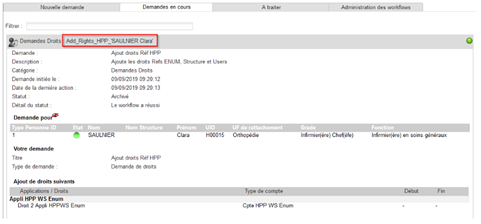
|
| Code | Code identifying the configuration of a Workflow, it must be unique. |
Mandatory. Character string, without spaces or special characters. |
| Description |
Workflow description. This will be displayed on the user interface for user request workflows. |
Character string. |
| Title | Title of the Workflow as it will be displayed in the user interface. | Character string. |
| Allow note(s) to be added | Allows you to allow or prohibit the addition of notes to workflow instances from the user interface. |
Yes/No. Default value = No |
| Archiving period (days) | Defines the length of time that archived workflow instances remain in the database. |
Digital. The archiving period begins as soon as the workflow is complete. Once the archiving period has expired, the workflow instance is automatically deleted from the database. (Not valid for deferred workflows that are never deleted) Default value = 0. |
Initialization settings¶
The initialization settings allow you to define the type of workflow and its characteristics, as well as the trigger mode. The configuration fields vary depending on the type of workflow selected.
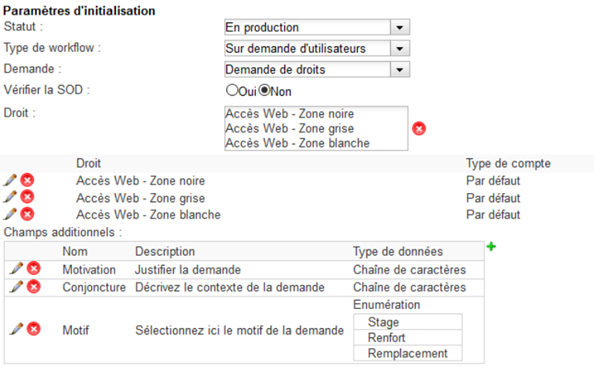
The initialization settings common to all types of workflows are as follows:
| Parameter | Description | Type and possible values |
|---|---|---|
| Statut | Parameter specifying the status of the workflow. Only workflows in production will be executed by the workflow engine and available in a user's list of requests. |
Under construction In production Suspended Enabled |
| Workflow type | Choice of workflow type. |
At the request of users: A user request form is available from the “workflow” menu of the operating console. On an event: Triggering of the workflow conditioned by a cyberelements Identity event that may be subject to validation, such as assignments or deassignments (accounts, profiles, delegation, resources, persons), creations, modifications, or deletions (persons, rights, structures, authorization rules, enumerations, synchronizations), delegations and deletions of delegations, certifications and de-certifications of rights, context changes, identity reconciliations, and staff transfers. Delayed triggering: Triggering the workflow based on a date attribute of the person (for example: start date, end date, date of birth), or based on the expiration date of a right. Periodic: Workflow triggered based on an execution frequency. |
The initialization parameters depending on the workflow type are described below:
-
“User request” workflow type: several types of “user request” workflows are available, and the configuration of the initialization parameters differs depending on the type chosen.
- Request for rights: allows a user to request rights via a form. They can make the request for themselves or for one or more other people.
Parameter Description Type and possible values Request Nature of the user request. Rights request Check SOD Requires verification of the rules for separating rights when filling out the request form. The user will not be able to validate their request if the requested rights do not comply with SOD rules. Yes/No Right List of rights that the user starting the workflow can request. List of rights. Additional fields Allows you to configure additional text or enumerated fields in the request form. Selection of one or more attributes (character string or enumerated types only) from the list of existing attributes. - Attribute modification request: allows a user to request a change to the value of one or more attributes via a form. They can make the request for themselves or for one or more other people.
Parameter Description Type and possible values Request Nature of the user request. Request for attribute modification Attribute selection List of attributes that the user starting the workflow can modify. List of attributes.
Visible if: Request = “Request to modify attributes”- Resource request: allows a user to submit a request for resource allocation via a form. They can make the request for themselves or for one or more other people.
Parameter Description Type and possible values Request Nature of the user request. Resource request Resource type Type of resources that the user starting the workflow can request. Resource type. (Please note that to use this feature correctly, you must select only one type of resource per workflow) - Manual provisioning request: allows a user to submit a manual provisioning request via a form. They can make the request for themselves or for one or more other people.
Parameter Description Type and possible values Request Nature of the user request. Manual provisioning request Check SOD Requires verification of the rules for separating rights when filling out the request form. The user will not be able to validate their request if the requested rights do not comply with SOD rules. Yes/No Right List of rights that the user starting the workflow can request. List of rights. Additional fields Allows you to configure additional text or enumerated fields in the request form. Selection of one or more attributes (character string or enumerated types only) from the list of existing attributes. - Other request: allows a user to make a personalized request via a form. The request is made in text form. They can make the request for themselves or for one or more other people.
Parameter Description Type and possible values Request Nature of the user request. Other request Description of the request Description Character string. -
“On an event” workflow type: events are generated by Systancia Identity for each operation included in the following list.
| Parameter | Description | Type and possible values |
|---|---|---|
| Event | Parameter specifying the event(s) that trigger the workflow. | List of events (see list below) |
| Option to trigger based on the status of the action | Trigger condition linked to the status of the action that generated the event. | Success/Failure/Both |
| Workflow trigger option based on the action timeline | Workflow trigger condition |
Before/After/Both. Before: check this option to create a validation before the event actually occurs (example: validation of a person creation). After: check this option so that the first step is triggered after the event has occurred. |
| Conditions to be validated | Workflow triggered if all or part of the events sent are validated. |
At least one of the conditions must be validated, All conditions must be validated. |
| Grouping | Allows only one workflow to be triggered when a batch of similar events is sent at the same time. |
Yes/No. This option is available for the following six events: Assigning rights Modifying rights Modifying a person Reconciling a person's identities Withdrawing rights Deleting a person's identity reconciliation |
List of events and optional parameters
- “Delayed Trigger” workflow type: it is possible to trigger a workflow X days before or after the date of a defined attribute or the end date of a specified right.
| Parameter | Description | Type and possible values |
|---|---|---|
| Based on | Parameter used to specify the date attribute on which the workflow will be based. |
“On attribute”: List of date attributes. “On expiration of a right”: applies to all rights with an end date specified. |
| Time period |
“Before” (number of days): Execute the workflow in advance based on the value of the target date attribute. “After” (number of days): Execution of the workflow delayed based on the value of the target date attribute. |
Integer. |
- “Periodic” workflow type: allows workflows to be sent at a specified frequency
| Parameter | Description | Type and possible values |
|---|---|---|
| Every | Parameters for specifying the frequency with which a periodic workflow is triggered. |
Frequency to be selected from the list:
|
| Sending time | Time when the periodic workflow is triggered. | Integers. Defines the sending time when the selected frequency is day, week, or month, or the time of the first sending when the frequency is of type “hour”. |
User(s)¶
The “Users” section allows you to define which people or identities can execute a workflow. The possibilities vary depending on the type of workflow chosen.
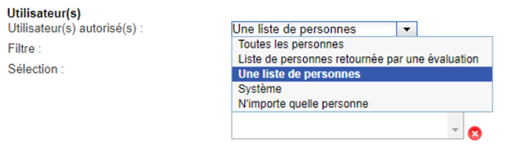
| Parameter | Description | Type and possible values |
|---|---|---|
| Authorized user(s) | Person(s), real or system, authorized to start the workflow. |
|
| Filter |
Filter type defining how the list of persons authorized to start the workflow is retrieved. Example: Users with cyberelements Identity administration rights or who are responsible for a service. |
Visible if “Authorized user(s)” = “A list of persons”:
|
| Selection | List resulting from the selection of persons made during configuration. |
Visible if “Authorized user(s)” = “A list of persons” and if “Filter” = “List (ids)”. List of persons to select. 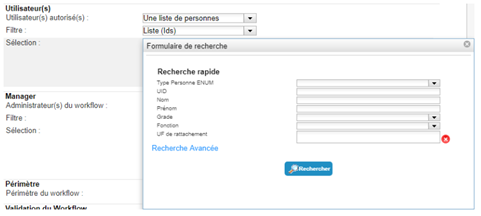
|
| Filter query | Parameter allowing you to specify an SQL query to filter the desired persons. |
Visible if “Authorized user(s)” = “A list of persons” and if “Filter” = “List of IDs returned by an SQL evaluation”. Character string: SQL query used to filter the desired persons. Refer to this page for the use of keywords. 
|
Allow the execution for myself?¶
This option is only visible if the workflow type is set to “On User Request”. It allows you to authorize or deny a user from submitting a request for themselves.
The number of users authorized to submit a request for themselves can also be reduced using filters.
It is also possible to configure a workflow to allow execution only for oneself. The configurations to be implemented are detailed below.
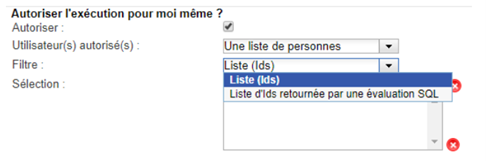
| Parameter | Description | Type and possible values |
|---|---|---|
| Allow | Parameter indicating whether the user making a request can do so on their own behalf. |
|
| Filter |
Filter type defining how the list of persons authorized to make a request is retrieved. Example: Users with cyberelements Identity administration rights or who are responsible for a service. |
Visible if “Allow” = Yes (checked).
|
| Selection | List resulting from the selection of persons made during configuration. |
Visible if “Authorized user(s)” = “A list of persons” and if “Filter” = “List (ids)”. List of persons to select.
|
| Filter query | Parameter allowing you to specify an SQL query to filter the desired persons. |
Visible if “Authorized User(s)” = “A list of persons” and if “Filter” = “List of IDs returned by an SQL evaluation”. Character string: SQL query used to filter the desired persons. If the workflow can only be executed for oneself, then use the following syntax: §PERSON§ATTRIBUTE§UID§=#STARTER#ATTRIBUTE#UID# Refer to this page for the use of keywords. |
Manager¶
The “Manager” section allows you to define which people can manage instances of this workflow, i.e., these people will be authorized to view and act on workflow instances as long as the workflow is not in completed/archived status.

| Parameter | Description | Type and possible values |
|---|---|---|
| Workflow administrator(s) | Real person(s) authorized to manage the workflow, i.e., to pause, restart, stop, and validate actions such as approvals. | List of persons. |
| Filter | Filter defining how the list of persons authorized to administer the workflow is retrieved. |
|
| Selection | List resulting from the selection of persons made during configuration. |
Visible if “Authorized user(s)” = “A list of persons” and if “Filter” = “List (ids)”. List of persons to select.
|
| Filter query | Parameter allowing you to specify an SQL query to filter the desired persons. |
Visible if “Authorized user(s)” = “A list of persons” and if “Filter” = “List of IDs returned by an SQL evaluation”. Character string: SQL query used to filter the desired persons. Refer to this page for the use of keywords. -->
|
Scope¶
The “Scope” section allows you to define conditions for filtering the identities that can be targeted by the workflow. The workflow scope only applies to workflows of the “On event”, “Delayed trigger”, or “On user request” types.
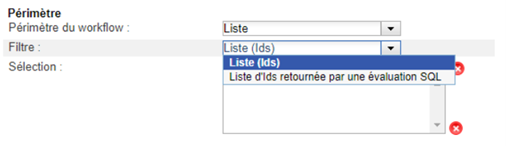
| Parameter | Description | Type and possible values |
|---|---|---|
| Workflow scope: | Real person(s) on whom the workflow is executed (allows you to filter the target of the workflow). |
Example: for a workflow on a person creation event, you could limit the scope to external person creations. For rights requests, requests could be limited to users of a service. |
| Filter | Filter type defining how the list of target persons for the workflow is retrieved. |
|
| Selection | List resulting from the selection of persons made during configuration. |
Visible if “Authorized user(s)” = “A list of persons” and if “Filter” = “List (ids)”. List of persons to select.
|
| Filter query | Parameter allowing you to specify an SQL query to filter the desired persons. |
Visible if “Authorized user(s)” = “A list of persons” and if “Filter” = “List of IDs returned by an SQL evaluation”. Character string: SQL query used to filter the desired persons. Refer to this page for the use of keywords.
|
Workflow validation¶
The “Workflow validation” section consists of defining the status of the workflow instance based on the statuses of the steps that make up the workflow. Workflow managers can also be authorized to validate (the validation steps) on behalf of validators (to unblock workflows in the event of absence, for example).
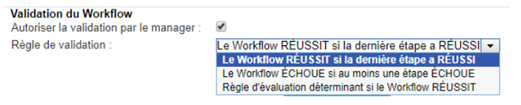
| Parameter | Description | Type and possible values |
|---|---|---|
| Allow validation by manager | Allows workflow validation by workflow managers (in addition to validators defined in workflow steps). |
|
| Validation rule | Parameter used to define the rule to be checked to indicate whether the workflow has succeeded or failed. |
|
| Query | Parameter allowing you to specify an SQL query to more precisely define the elements that will determine whether a workflow will be in the “Successful” state. |
Visible if “Validation Rule” = “Evaluation rule determining whether the workflow succeeds”. Character string: SQL query used to extract the elements that will determine whether a workflow is in the “Successful” or “Failed” state. The query must return a Boolean value. If the returned value is 1, the workflow will be in the “Successful” state; otherwise, it will be in the “Failed” state. Refer to this page for the use of keywords. 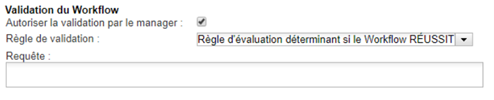
|
Note on workflow validation:
When an action (or step) is not executed because the context does not meet the conditions for executing the action (or step), no action (or step) instance is created in the database.
It is therefore not possible to retrieve the status of the action or step.
If, for a given step without execution conditions, none of its actions have been executed, the step instance exists in the database and its status is successful.
Operations subject to validation are only validated if the workflow ends successfully.