Moving a structure in an organizational tree
Moving a structure involves changing the parent of a structure. This can be done either manually via the interface or automatically via a provisioning connector.
Moving a structure via the interface
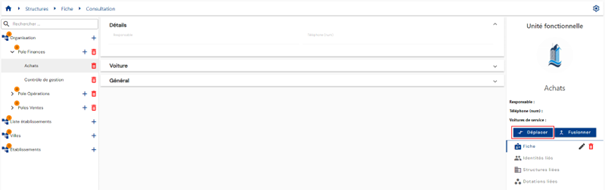
To move a structure, open the structure in view mode and click the “Move” button.
Select the new parent structure.
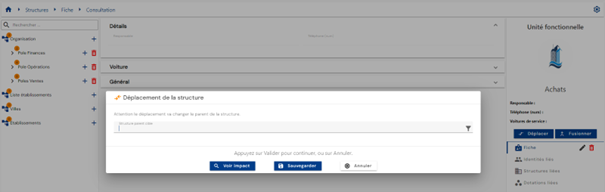
You can click on the “View impacts” button before confirming the change.
Actions on buttons:
- See the impacts: Two impact tables can be displayed by clicking on the “Display” buttons:
The first table lists all the theoretical impacts related to the structure change:
- The rights inherited from the new parent structure for persons belonging to the structure undergoing change are marked as added rights without taking into account the actual rights model.
- The rights inherited from the old parent structure for persons belonging to the structure undergoing change are marked as deleted rights without taking into account the actual rights model.
The second table lists the actual impacts related to the structure change:
-
Rights marked as added or removed take into account the rights model (example: a person belonging to the structure undergoing change who inherits a right linked to the new parent structure would not appear in the list if they already had the right via another authorization rule or via a manual addition).
-
Cancel: cancels the current entry and switches the page to view mode
-
Save: Validate the form and switch the page to view mode
Moving a structure via SIP
To move a structure via the Systancia Identity Provisioning (SIP) engine, you must create an upstream provisioning connector and configure the option to modify a structure's parent structure.
See the page Creating/modifying/deleting a structure via SIP.