List of operations available by synchronization rules
| Conversion |
Matching rules |
Comparison | Creation | Modification | Deletion | |
|---|---|---|---|---|---|---|
| ADDVALUE | X | X | X | X | ||
| CHANGE | X | X | X | X | ||
| COMPAREATTNAME | X | |||||
| COMPARE | X | |||||
| CONVERT | X | |||||
| COPY | X | X | X | X | ||
| DELETE | X | |||||
| DELVALUE | X | X | X | X | ||
| DELVALUEBYVALUE | X | X | X | X | ||
| DSTCOPY | X | X | X | X | ||
| EQ | X | X | ||||
| FILTERAR | X | |||||
| GETSTRUCTCHILD | X | |||||
| GROUPAR | X | |||||
| ISCONTAINED | X | |||||
| MERGE | X | |||||
| MODVALUE | X | X | X | X | ||
| MULTCOPY | X | X | X | |||
| MULTDSTCOPY | X | X | X | |||
| MULTIEVALEQ | X | |||||
| MULTSET | X | X | X | X | ||
| MVEQ | X | |||||
| RENAME | X | |||||
| SET | X | X | X | X | ||
| SIMPLEEQ | X | |||||
| SPLIT | X |
Options available for each operation:
| B64 | CI | DATE | DATE_FILETIME | DN | PARTIAL | PWD | USEMAP | |
|---|---|---|---|---|---|---|---|---|
| ADDVALUE | X | X | X | X | ||||
| CHANGE | X | X | X | X | ||||
| COMPAREATTNAME | X | X | ||||||
| CONTAIN | X | X | ||||||
| CONVERT | X | X | X | X | ||||
| COPY | X | X | X | X | ||||
| DELETE | X | X | X | X | ||||
| DELVALUE | X | X | X | X | ||||
| DELVALUEBYVALUE | X | X | X | X | ||||
| DSTCOPY | X | X | X | X | ||||
| EQ** | X | X | X | |||||
| FILTREAR | X | X | X | X | ||||
| GETSTRUCTCHILD | X | X | X | X | ||||
| GROUPAR | X | X | X | X | ||||
| ISCONTAINED | X | X | ||||||
| MERGE | X | X | X | X | ||||
| MODVALUE | X | X | X | X | ||||
| MULTCOPY | X | X | X | X | ||||
| MULTDSTCOPY | X | X | X | X | ||||
| MULTIEVALEQ | X | X | X | |||||
| MULTSET | X | X | X | X | ||||
| MVEQ | X | X | ||||||
| RENAME | X | X | X | X | ||||
| SET | X | X | X | X | ||||
| SIMPLEEQ** | X | X | X | |||||
| SPLIT | X | X | X | X |
**: The filters differ depending on the rule using the operation.
- B64: Converts the attribute value to Base 64 format.
- CI: Case insensitive: comparison is performed regardless of case.
- DATE: Converts the attribute value to DATE format.
- DATE_FILETIME: Converts the attribute value to DATETIME format.
- DN: DN comparison.
- PARTIAL: partially compares the data. Returns true if at least one value is contained in the comparison attribute.
- PWD: Enables data encryption.
- USEMAP: use of a map to find the attribute, speeds up the comparison process.
ADDVALUE
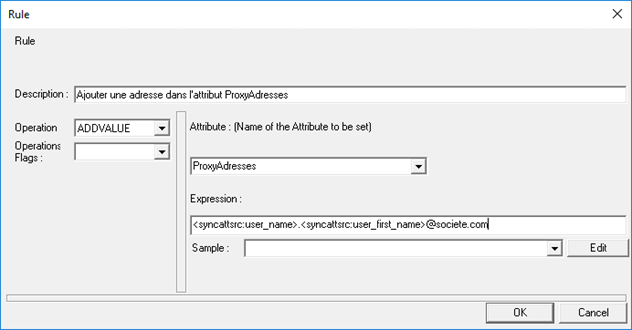
Operation that allows values to be added to an attribute that, by definition, can be multivalued. It also allows the concatenation of values from several attributes.
Function syntax:
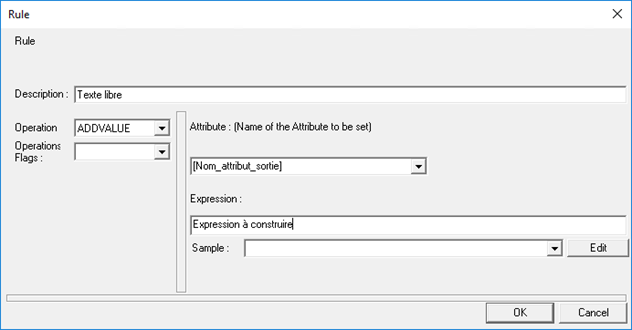
- [Description]: free text to describe the operation (optional).
- [Attribute]: name of the attribute to be modified. If the attribute does not exist, it will be created automatically.
- [Expression]: formula to be entered. It is possible to use keywords or enter all or part of fixed values (hard-coded text). Refer to the “List of keywords” chapter for the syntax to apply in your use case.
Example of the following configuration:
CHANGE
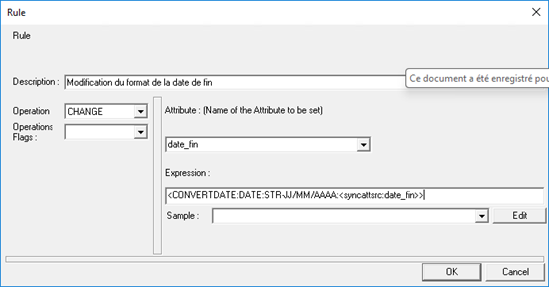
Operation that allows you to modify an attribute value. The attribute must exist and be single-valued. The initial value of the attribute is overwritten and can no longer be reused.
Function syntax:
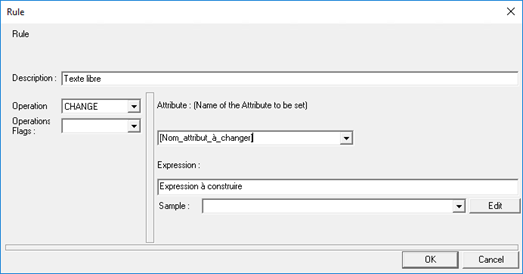
- [Description]: free text to describe the operation (optional).
- [Attribute]: name of the attribute to be modified. If the attribute does not exist, the operation will not work.
- [Expression]: formula to be entered. It is possible to use keywords or enter all or part of fixed values (hard-coded text). Refer to the “List of keywords” chapter for the syntax to apply in your use case.
Example of the following configuration:
COMPAREATTNAME
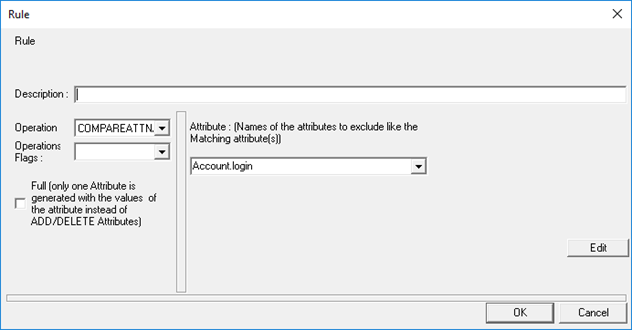
Operation that allows you to list attributes that should not be compared and to compare all other attributes that have the same name in both repositories. Attribute names in the source repository that do not have a counterpart in the target repository will be ignored and not compared. It can be used to replace the unitary mapping of attributes to be compared.
Please note that this operation is only available from version 6.2 onwards and can only be used in OnCompare rules in a MATCH operation in provisioning status (status) provisioning connectors.
Function syntax:
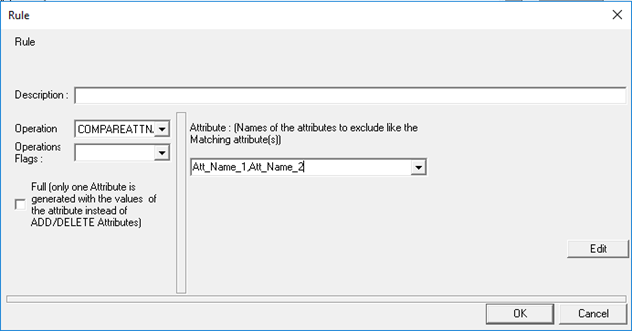
- [Attribute] = List of attributes not to be compared. Attributes must be separated by commas and without spaces.
Example of the following configuration:
CONTAIN
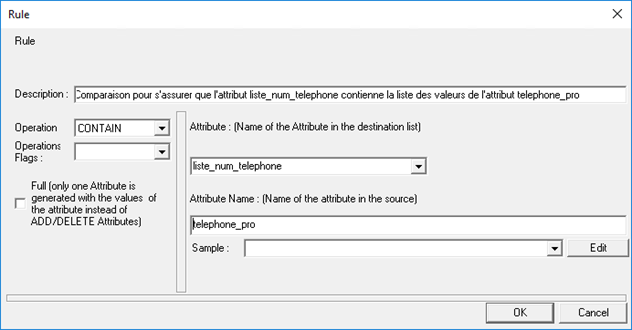
Operation that performs a comparison to verify that the values of the authoritative source attribute are present in the target source attribute. The result of the operation will be the concatenation of the values of the target source attribute with the values of the authoritative source attribute that were not found.
Example
Authoritative_source_attribute_values =
- Val_1
- Val_2
- Val_3
Source_target_attribute_values =
- Val_4
- Val_5
- Val_6
Result in the target source attribute =
- Val_1
- Val_2
- Val_3
- Val_4
- Val_5
- Val_6
No keywords can be used in this operation.
Function syntax:
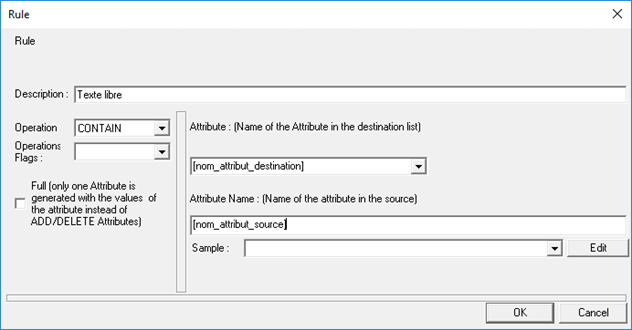
- [Description]: free text to describe the operation (optional).
- [Attribute]: name of the attribute present in the target source on which the comparison is to be performed.
- [Attribute Name]: name of the attribute present in the authoritative source on which the comparison is to be performed.
Example of the following configuration:
CONVERT
COPY
Operation that allows you to copy the value of one attribute to another attribute. It works for single-valued and multi-valued attributes.
Function syntax:
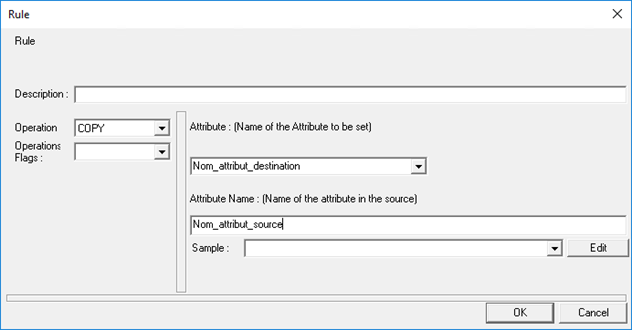
- [Description]: free text to describe the operation (optional).
- [Attribute]: name of the attribute to be modified. The attribute must exist.
- [Attribute Name]: name of the source attribute whose value will be copied.
Example of the following configuration:
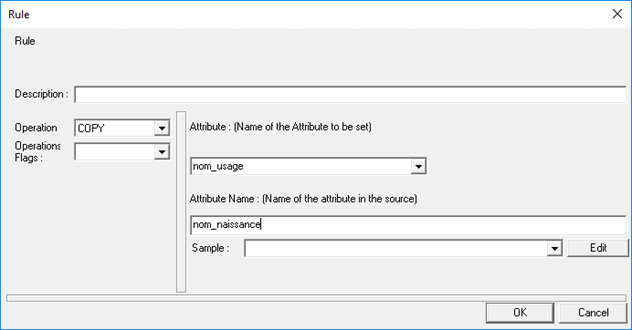
The ‘usual_name’ attribute will take the value of the ‘birth_name’ attribute.
DELETE
Operation that allows you to delete an attribute in a specified source (export source, export target, or DELTA).
Function syntax:
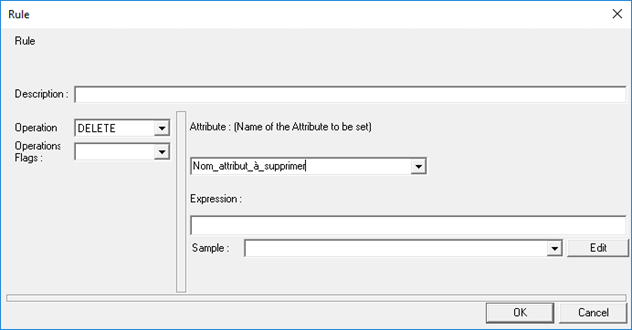
- [Description]: free text to describe the operation (optional).
- [Attribute]: name of the attribute to be deleted.
- [Expression]: do not fill in this field.
DELVALUE
Operation that allows values to be deleted from an attribute based on a Boolean expression: if the expression returns “True” then the values are deleted. It therefore generally applies to multi-valued attributes.
Function syntax:
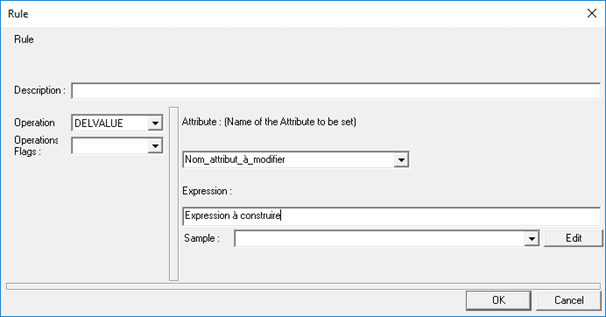
- [Description]: free text to describe the operation (optional).
- [Attribute]: name of the attribute to be modified.
- [Expression]: formula to be entered. It is possible to use keywords or enter all or part of fixed values (hard-coded text). Refer to the “List of keywords” chapter for the syntax to apply in your use case.
Example of the following configuration:
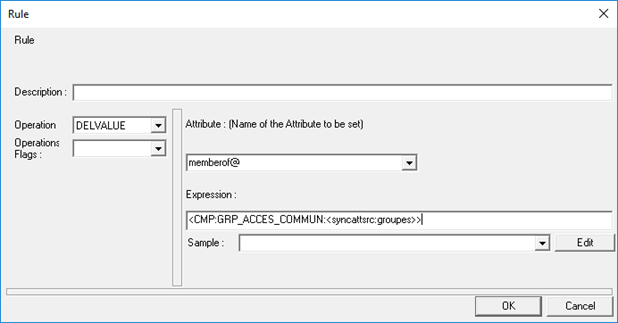
If the “groups” attribute contains the value ‘GRP_ACCES_COMMUN’, then it will be removed from the list of “groups” values and the modified list of the ‘groups’ attribute will be copied to the “memberof@” attribute.
DELVALUEBYVALUE
Operation that allows values to be deleted from an attribute based on a given list. It therefore generally applies to multi-valued attributes.
Function syntax:
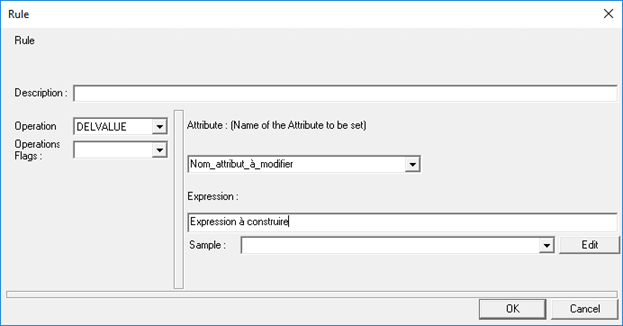
- [Description]: free text to describe the operation (optional).
- [Attribute]: name of the attribute to be modified.
- [Expression]: Values to be entered, separated by “;”. It is possible to use keywords or enter all or part of fixed values (hard-coded text). Refer to the “List of keywords” chapter for the syntax to apply in your use case.
Example of the following configuration:
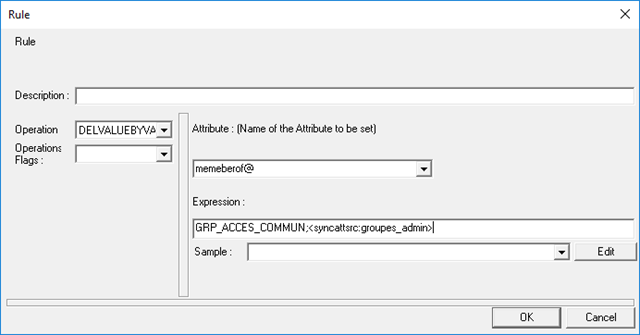
The values of the “groups_admin” attribute and the value ‘GRP_ACCES_COMMUN’ are removed from the list of values contained in “memberof@”.
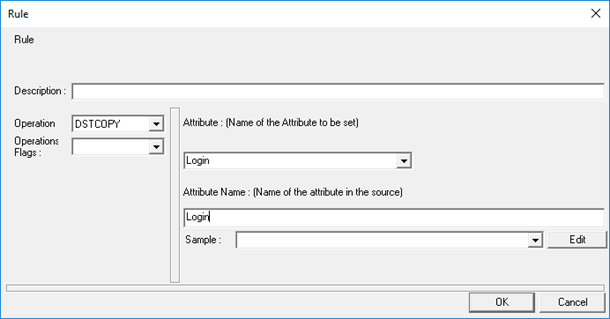
DSTCOPY
Operation that copies the value of an attribute found in the target export to another attribute in the DELTA file. It works for single-valued and multi-valued attributes. It is generally used to transfer values from the target repository that are unknown in the source repository, often in the case of deletion (not known in the source but still present in the target).
Function syntax:
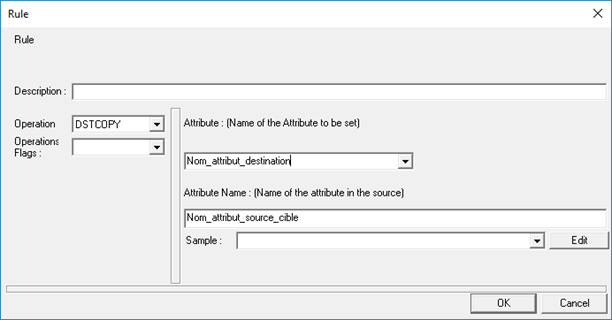
- [Description]: free text to describe the operation (optional).
- [Attribute]: name of the destination attribute.
- [Attribute Name]: name of the source attribute whose value will be copied.
Example of the following configuration:
EQ
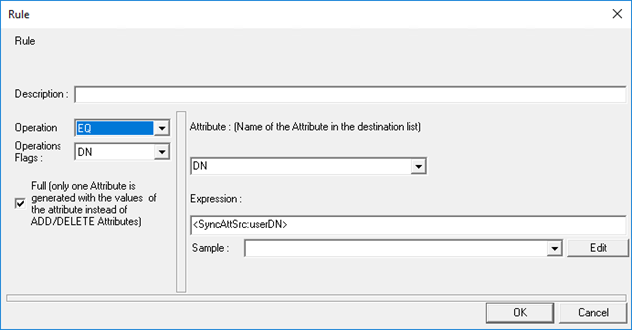
Operation that compares two single-valued attributes.
Function syntax:
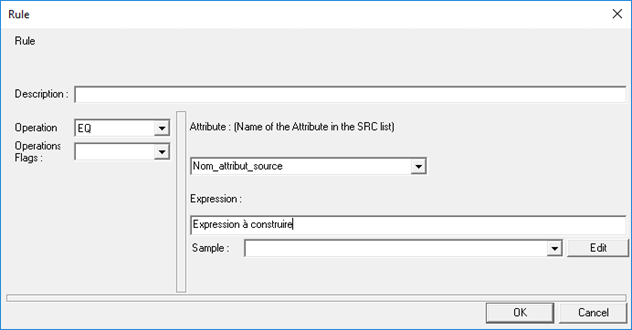
- [Description]: free text to describe the operation (optional).
- [Attribute]: name of the attribute to be compared, present in the source export.
- [Expression]: formula to be entered. It is possible to use keywords or enter all or part of fixed values (hard-coded text). Refer to the “List of keywords” chapter for the syntax to apply in your use case.
Example of the following la configuration:
GETSTRUCTCHILD
Allows you to retrieve the list of child structures in the “Destination_attribute_name” attribute of a given structure in “Parent_structure_attribute_name”. This operation can only be performed on data from the Identity repository (for example, on an export of identities that has a structure-type attribute).
Function syntax:
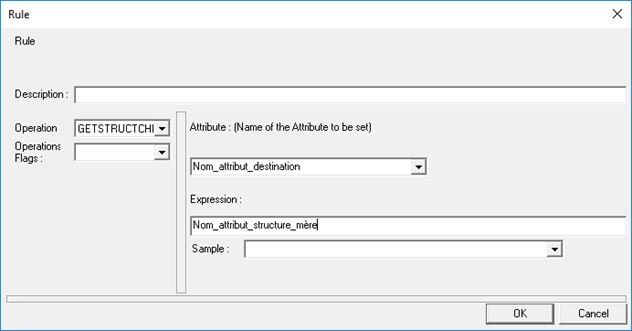
- [Description]: free text to describe the operation (optional).
- [Attribute]: name of the destination attribute that will receive the list of child structures.
- [Expression]: Name of the attribute of the parent structure without any keywords.
Example of the following configuration:
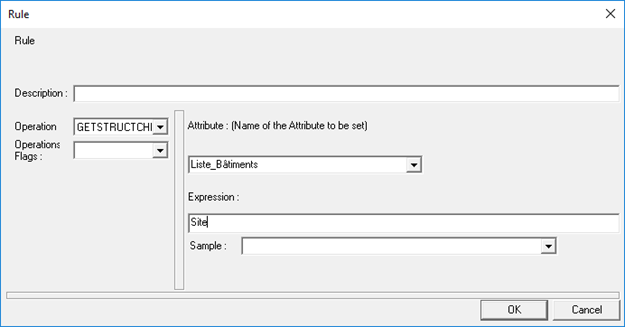
Returns all child structures of the structure with the code “Site”.
ISCONTAINED
Operation that compares a multivalued attribute in the authoritative source with a multivalued attribute in the target source in order to extract only the list of values that are present in both attributes.
Example:
Authoritative_source_attribute_values =
- Val_1
- Val_2
- Val_3
- Val_4
Source_target_attribute_values =
- Val_3
- Val_4
- Val_5
Result in the target source attribute =
- Val_3
- Val_4
No keywords can be used in this operation.
Function syntax:
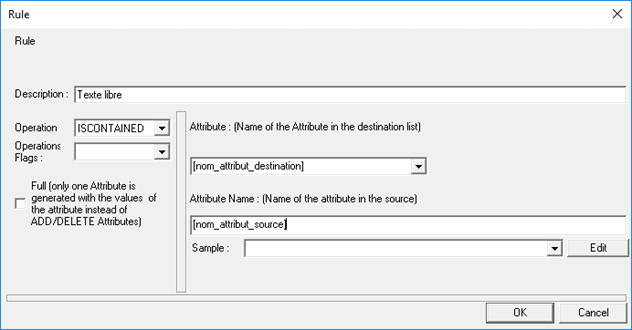
- [Description]: free text to describe the operation (optional).
- [Attribute]: name of the attribute present in the target source on which the comparison is to be performed.
- [Attribute Name]: name of the attribute present in the authoritative source on which the comparison is to be performed.
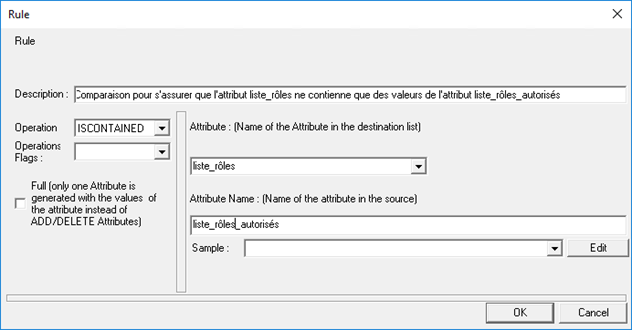
Example of the following configuration:
MERGE
Operation that allows you to create a concatenation of values from a multi-valued attribute and assign it to a single-valued attribute.
Please note that this operation is only available from version 6.2 onwards.
Function syntax:

- [name_out_attribute_monovalue] = Name of the attribute to be supplied as output.
- [Expression] = [separator];[name_attribute_multivalues]
- [separator]: The separator must be a single character and cannot be ";", as this character is used in the connector configuration file.
- [name_attribute_multivalues]: Name of the multivalued attribute whose values must be concatenated.
Use mode:
The MERGE operation can be used in synchronization rules and only in CONVERT operations.
Example of the following configuration:
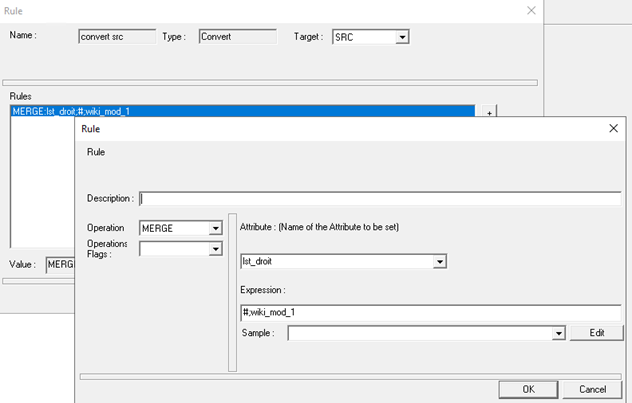
- With "wiki_mod_1" attribute equal to:
- Droit_001
- Droit_002
- Droit_003
- Result: in the sync.xml file, the "lst_right" attribute will have the following value:
- Droit_001#Droit_002#Droit_003
MODVALUE
Operation that allows you to modify an attribute value. The attribute must exist and be single-valued. The initial value of the attribute is overwritten and can no longer be reused.
Function syntax:
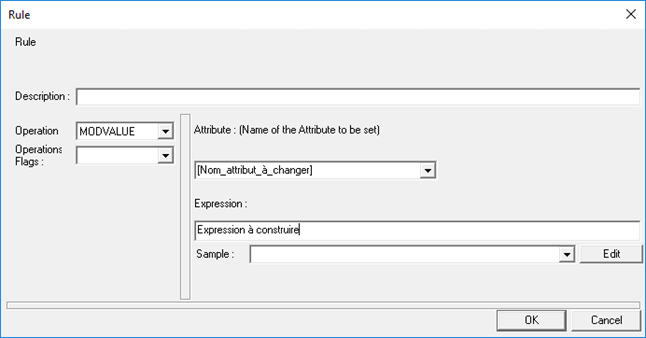
- [Description]: free text to describe the operation (optional).
- [Attribute]: name of the attribute to be modified. If the attribute does not exist, the operation will not work.
- [Expression]: formula to be entered. It is possible to use keywords or enter all or part of fixed values (hard-coded text). Refer to the “List of keywords” chapter for the syntax to apply in your use case.
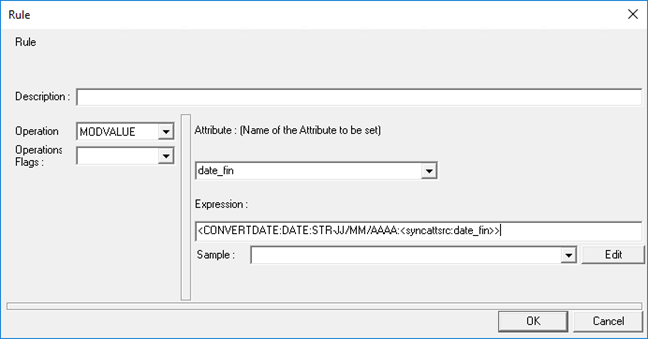
Example of the following configuration:
MULTCOPY
Copy attributes from source
Operation that copies attribute values from the source export to attributes in the DELTA file. It works for single-valued-valued attributes .
Function syntax:
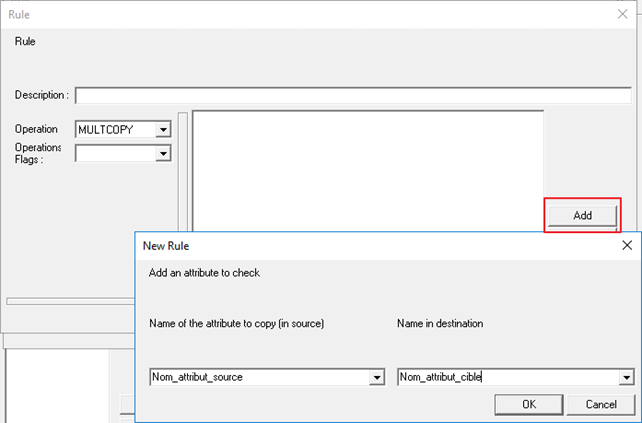
- [Description]: free text to describe the operation (optional).
- [Attribute name to copy]: Name of the attribute that must be in the source export. The attribute must exist.
- [Target attribute name]: The attribute must exist. Name of the attribute that must be included in the target export, which will be located in the DELTA file.
The operation must be performed as many times as necessary.
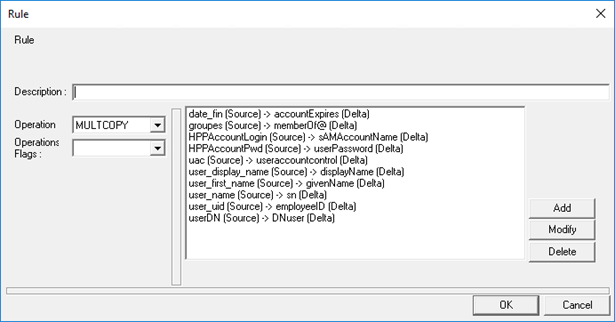
Example of the following configuration:
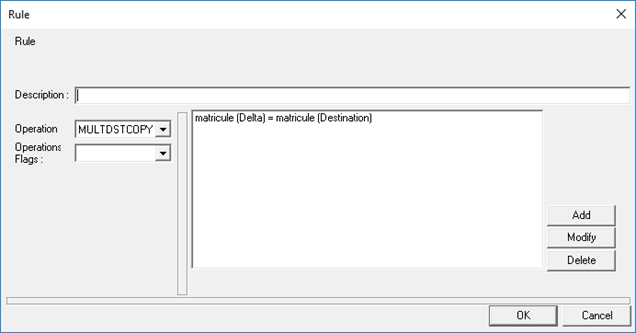
MULTDSTCOPY
Operation that copies attribute values found in the target export to attributes in the DELTA file. It works for single-valued-valued attributes . It is generally used to report values from the target repository that are unknown in the source repository, often in the case of deletion (no longer known in the source but still present in the target).
Function syntax:

- [Description]: free text to describe the operation (optional).
- [Attribute name to copy]: Name of the attribute that must be included in the target export. The attribute must exist.
- [Target attribute name]: Name of the destination attribute that must be found in the DELTA file.
The operation must be performed as many times as necessary.
Example of the following configuration:
MULTIEVALEQ
Operation that compares multiple multivalued attributes.
Function syntax:
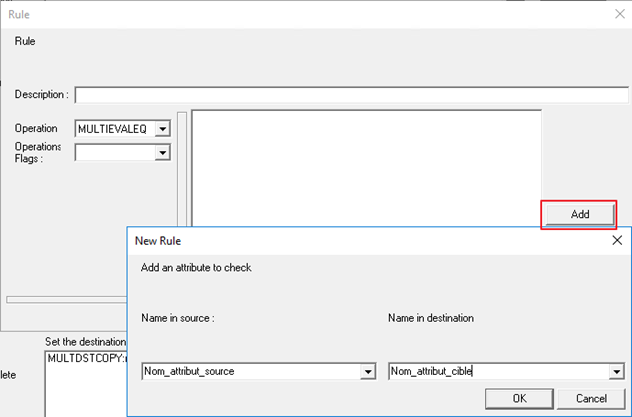
- [Description]: free text to describe the operation (optional).
- [Source attribute name]: name of the attribute to be compared, present in the source export.
- [Destination attribute name]: name of the attribute to be compared, present in the destination export.
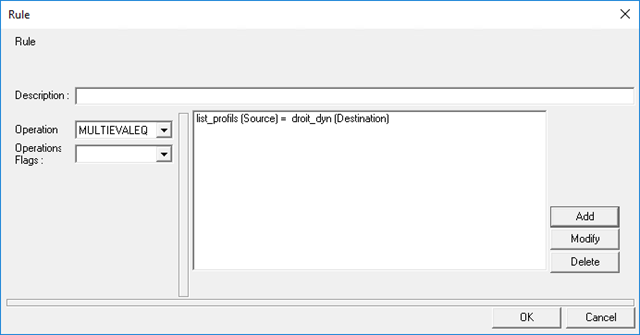
The operation must be performed as many times as necessary. Objects are paired if all attributes are equal.
Example of the following configuration:
MULTSET
Operation that allows you to make copies of multi-valued attributes with the option of adding a prefix.
Function syntax:
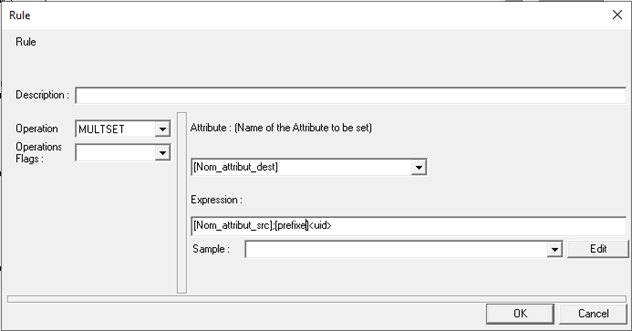
- [Nom_attribut_dest] = Name of the attribute to be supplied as output. The attribute need not exist beforehand.
- [Nom_attribut_src] = Name of the attribute whose values will be copied. Attention, do not use the <syncattsrc> or <syncattdst> keywords.
- [prefixe] = String to be added before each value of the [Nom_attribut_src] attribute. The prefix can be the value of an attribute using the
Use mode:
The MULTSET operation can be used in synchronization rules for CONVERT and MATCH operations (OnCreate, OnModify and OnDelete).
Example of the following configuration:
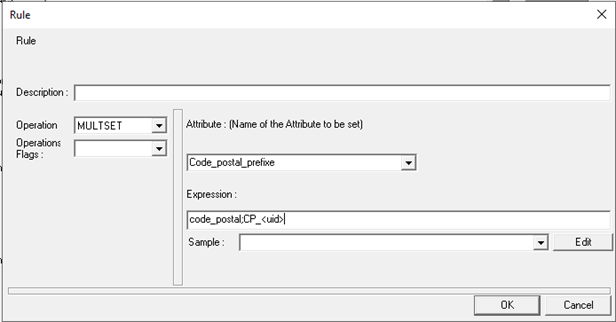
- With "postal_code" attribute equal to:
- 68300
- 68390
- 38670
- Result: in the sync.xml file, the "Code_postal_prefix" attribute will have the following values:
- CP_68300
- CP_68390
- CP_38670
MVEQ
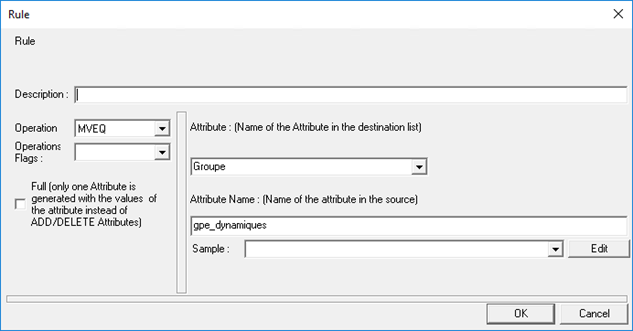
Operation that compares 2 multivalued attributes.
Function syntax:
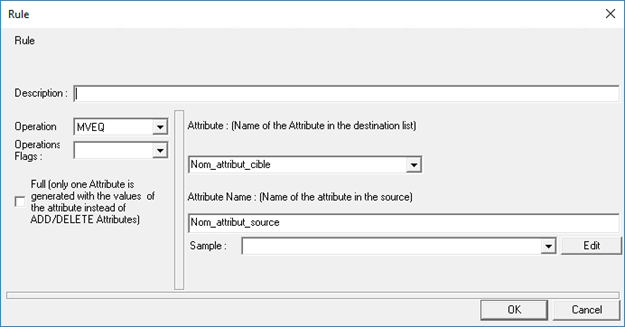
- [Description]: free text to describe the operation (optional).
- [Attribute]: name of the attribute to be compared, present in the target export.
- [Attribute Name]: name of the attribute to be compared, present in the source export.
Example of the following configuration:
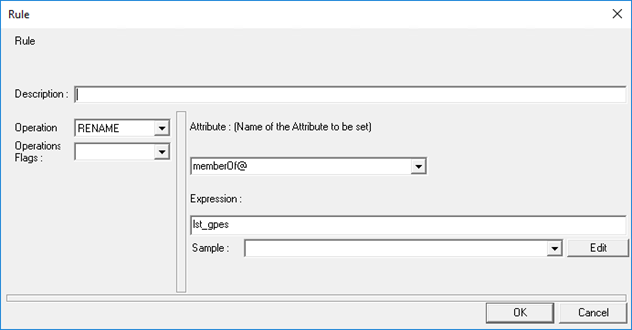
RENAME
Operation that renames an attribute.
Function syntax:
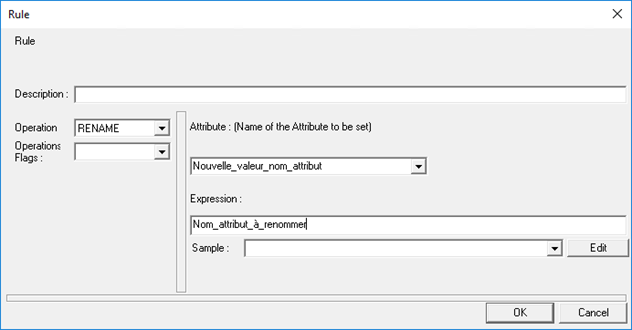
- [Description]: free text to describe the operation (optional).
- [Attribute]: new name of the attribute.
- [Expression]: name of the attribute to be renamed.
Example of the following configuration:
SET
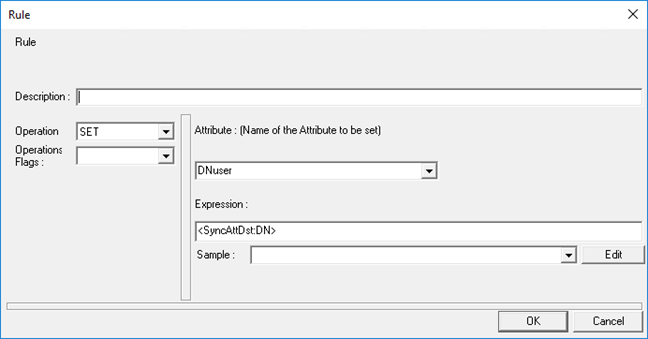
Operation that allows you to assign a value to an attribute, single-valued only, whether it exists or not.
Function syntax:
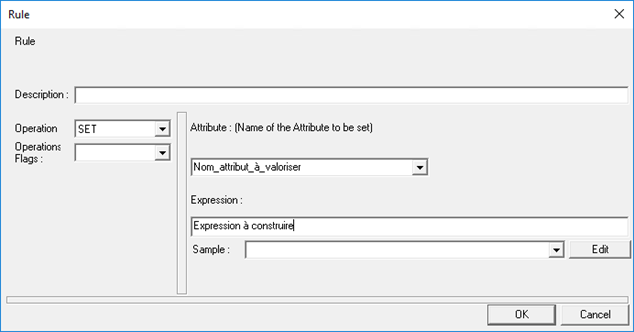
- [Description]: free text to describe the operation (optional).
- [Attribute]: name of the attribute to be assigned a value. If the attribute exists, the initial value will be overwritten; if the attribute does not exist, it will be created.
- [Expression]: formula to be entered. It is possible to use keywords or enter all or part of fixed values (hard-coded text). Refer to the “List of keywords” chapter for the syntax to apply in your use case.
Example of the following configuration:
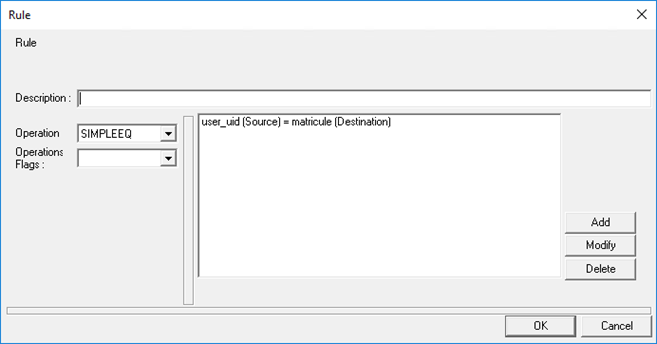
SIMPLEEQ
Operation that compares several single-valued attributes.
Function syntax:
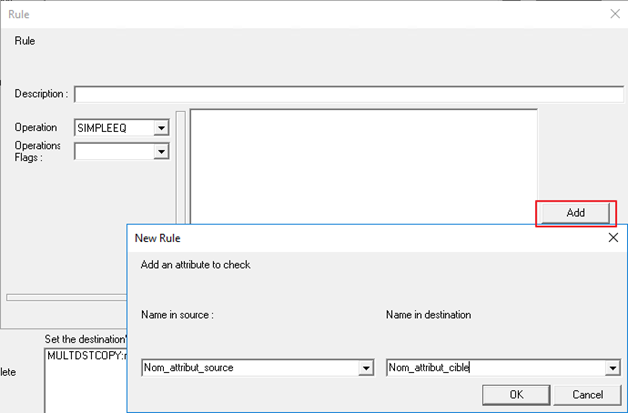
- [Description]: free text to describe the operation (optional).
- [Source attribute name]: name of the attribute to be compared, present in the source export.
- [Destination attribute name]: name of the attribute to be compared, present in the destination export.
The operation must be performed as many times as necessary. Objects are paired if all attributes are equal.
Example of the following configuration:
SPLIT
Operation used to create a separation of values from a monovalent attribute and a separator, then assign it to a multivalent attribute.
Please note that this operation is only available from version 6.2 onwards.
Function syntax:
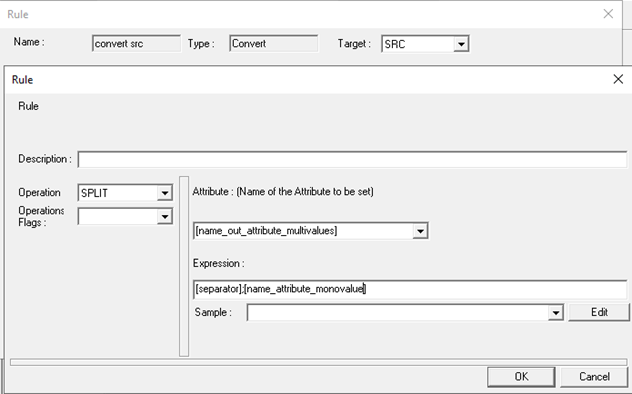
- [name_out_attribute_multivalues] = Name of the attribute to be supplied as output.
- [Expression] = [separator];[name_attribute_monovalue]
- [separator]: The separator must be a single character and cannot be ";", as this character is used in the connector configuration file.
- [name_attribute_multivalues]: Name of the multivalued attribute whose values must be concatenated.
Possible results:
- If the separator is found at least once: returns a list of values
- If the separator is not found: returns the complete string
Possible results:
The SPLIT operation can be used in synchronization rules and only in CONVERT operations.
Example of the following configuration:
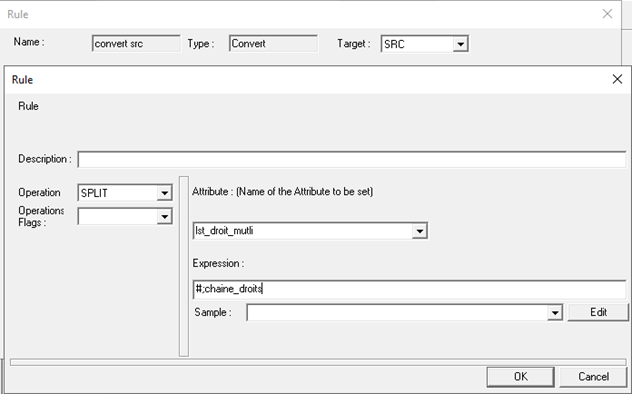
- With "string_rights" attribute equal to:
- Droit_001#Droit_002#Droit_003
- Result: in the sync.xml file, the “lst_right_multi” attribute will have the following value:
- Droit_001
- Droit_002
- Droit_003