Tests and comparisons
CMP
Function that compares two strings, case-sensitive.
Function syntax:
<CMP:[chaîne_caractère_1]:[chaîne_caractère_2]>
Character strings can be an attribute, in which case you must use the keyword <syncattsrc:[attribute_name]> or <syncattdst:[attribute_name]> depending on whether the operation is on the source or destination repository.
Use mode:
- The keyword CMP can be used in all fields of type “expression” such as operations of type COPY, MODVALUE, etc.
- It is usually combined with the IF or SWITCH keywords.
Possible results:
- True: if the two character strings are identical.
- False: if the two character strings are different.
Examples of configuration:
- Example:
- <IF:<CMP:<SyncAttSrc:STATUT>:Done>:OK:KO>
CMPi
Function that compares two strings without taking case into account.
Function syntax:
<CMP:[chaîne_caractère_1]:[chaîne_caractère_2]>
Character strings can be an attribute, in which case you must use the keyword <syncattsrc:[attribute_name]> or <syncattdst:[attribute_name]> depending on whether the operation is on the source or destination repository.
Use mode:
- The keyword CMPi can be used in all fields of type “expression”, such as COPY, MODVALUE, etc.
- It is usually combined with the IF or SWITCH keywords.
Possible results:
- True: if the two character strings are identical.
- False: if the two character strings are different.
Examples of configuration:
- Example: <IF:<CMP:<SyncAttSrc:STATUT>:Completed>:OK:KO>
EXISTS
Function that allows you to test for the presence of an attribute in an export.
Function syntax:
<EXISTS:[searched_attribute_name]:[DataSource]:[Operation]>
- [nom_attribut_recherché] = Name of the attribute whose existence must be tested
- [DataSource] = SRC or DST. Allows to search for the presence of the attribute either in the source repository export (=SRC) or in the target repository export (=DST). The parameter is optional unless an operation is specified. If the parameter is not specified, the SRC value is applied by default.
- [Operation] = ADD or DEL. Used to test the presence of the attribute with an ADD or DEL sub-operation. The parameter is optional.
Possible results:
Returns 1 if the attribute is found, otherwise returns 0.
Use mode:
- The EXISTS keyword can be used in all “expression” type fields such as COPY, MODVALUE, etc. operations or in execution conditions in the import rules of a DB connector.
Examples of configuration:
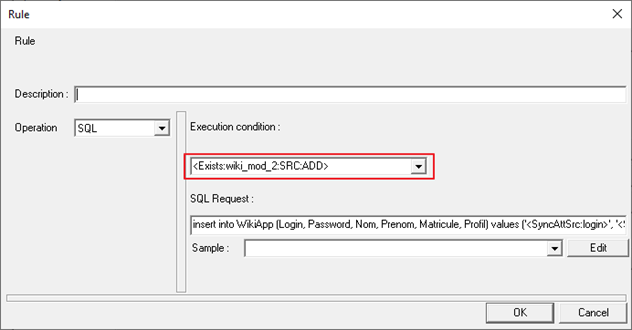
- Result: the SQL query will only be executed if the "wiki_mod_2" attribute is present in the source repository with an ADD sub-operation.
NOT
Returns 1 if the expression is false, and 0 otherwise..
Function syntax:
<NOT:[Expression]>
The expression may contain other keywords.
Use mode:
- The keyword NOT can be used in all fields of type “expression” such as operations of type COPY, MODVALUE, etc.
- Expressions returning a Boolean value are generally constructed from combinations of keywords such as CMP, IF, etc.
Examples of configuration:
- Example:
- <IF:<NOT:<CMP:<SyncAttSrc:STATUS>:Completed>>:Echec:Success>
- Returns “Success” if the status is equal to “Completed”, otherwise returns "Failure" if the status is not “Completed”.
&NOT
Binary operation ‘NOT’.
Function syntax:
<&NOT:[Expression]>
The expression may contain other keywords to retrieve an attribute value, for example.
Use mode:
- The keyword NOT can be used in all fields of type “expression” such as operations of type COPY, MODVALUE, etc.
- Expressions returning a Boolean value are generally constructed from combinations of keywords such as CMP, IF, etc.
Possible results:
- Binary value
Examples of configuration:
- Example:
- <&NOT:<CMP:<SyncAttSrc:STATUS>:512>>:Disabled:Enabled>
- Returns “Enabled” if the status is equal to “Completed”, otherwise returns “Failed” if the status is not “Completed”.
AND
Returns 1 (true) if expression 1 and expression 2 are true, 0 otherwise.
Function syntax:
<AND:[Expression_1]:[Expression_2]>
Use mode:
- The keyword AND can be used in all fields of type “expression” such as operations of type COPY, MODVALUE, etc.
- It is usually combined with the IF or SWITCH keywords.
Examples of configuration:
- Example: <IF:<AND:<CMP:<SyncAttSrc:person_type>:Agent>:<CMP:<SyncAttSrc:job>:Accountant>>:Agent_comptable:External_accountant>
ANDX
Returns 1 if all the expressions in the list are true, otherwise 0.
Function syntax: <ANDX:[Expression_1]:[Expression_2]:[Expression_n] >
Use mode:
- The keyword ANDX can be used in all fields of type “expression” such as operations of type COPY, MODVALUE, etc.
- It is usually combined with the IF or SWITCH keywords.
Examples of configuration:
- Example:
<IF:<ANDX:<CMP:<SyncAttSrc:person_type>:Agent>:<CMP:<SyncAttSrc:job>:Accountant>:<CMP:<SyncAttSrc:Is_Valid>:Yes>>:Agent_comptable:External_accountant>
&AND
Binary ‘AND’ operation between two values.
Function syntax:
<&AND:[decimal_value_1]:[decimal_value_2]>
Use mode:
- The &AND keyword can be used in all “expression” type fields such as COPY, MODVALUE, etc. operations.
- It is usually combined with the IF or SWITCH keywords.
Results:
- Returns a decimal value that corresponds to the result of the binary ‘AND’ operation between the two compared values.
Examples of configuration:
- Example:
- <&AND:7:11> will result in = 3
- With 7 having a binary value of “111” and 11 having a binary value of “1011”
- The result of the binary ‘AND’ operation between 111 and 1011 is equal to 11, or the decimal value 3.
OR
Returns 1 (true) if expression 1 or expression 2 are true, 0 otherwise.
Function syntax:
<OR:[Expression_1]:[Expression_2]>
Use mode:
- The keyword OR can be used in all fields of type “expression” such as operations of type COPY, MODVALUE, etc.
- It is usually combined with the IF or SWITCH keywords.
Examples of configuration:
- Example: <IF:<OR:<CMP:<SyncAttSrc:type_personne>:Agent>:<CMP:<SyncAttSrc:person_type >:Employee>>:Agent_comptable:External_accountant>
ORX
Returns 1 if any of the expressions in the list is true, 0 otherwise.
Function syntax:
<ORX:[Expression_1]:[Expression_2]:[Expression_n] >
Use mode:
- The keyword ORX can be used in all fields of type “expression” such as operations of type COPY, MODVALUE, etc.
- It is usually combined with the IF or SWITCH keywords.
Examples of configuration:
- Example: <IF:<ORX:<CMP:<SyncAttSrc:person_type>:Agent>:<CMP:<SyncAttSrc:person_type>:Employee>:<CMP:<SyncAttSrc:person_type>:Internal>>:Agent_interne:External_agent>
&OR
Binary ‘OR’ operation between two values.
Function syntax:
<&OR:[decimal_value_1]:[decimal_value_2]>
Use mode:
- The &OR keyword can be used in all “expression” type fields, such as COPY, MODVALUE, etc.
- It is usually combined with the IF or SWITCH keywords.
Results:
- Returns a decimal value that corresponds to the result of the binary ‘OR’ operation between the two compared values.
Examples of configuration:
- Example:
- <&OR:7:11> will result in = 15.
- With 7 having a binary value of “111” and 11 having a binary value of “1011”.
- The result of the binary ‘OR’ operation between 111 and 1011 is equal to 1111, or the decimal value 15.
SWITCH
Evaluates the expression and then compares it to each member of the list. If one of the members of the list matches (case sensitive), the associated value is returned. If no member of the list matches the expression and a “default” member is defined, the value associated with that member is returned.
Function syntax:
<SWITCH:[Expression]:[Searched_value_1],[Returned_value_1]:[Searched_value_2],[Returned_value_2]:[Searched_value_N],[Returned_value_N]:…:[default,value]>
Use mode:
- The keyword SWITCH can be used in all fields of type “expression” such as operations of type COPY, MODVALUE, etc.
- The evaluated expression can contain keywords to retrieve attribute values, for example SyncAttSrc or SyncAttDst.
Examples of configuration:
- Example: <SWITCH:<SyncAttSrc:job_code>:DOC,Doctor:NUR,Nurse:HCA,Healthcare Assistant>
SWITCHI
Identical to SWITCH but without regard to case. Evaluates the expression and then compares it to each member of the list. If one of the members of the list matches (case insensitive), the associated value is returned. If no member of the list matches the expression and a “default” member is defined, the value associated with that member is returned.
Function syntax:
<SWITCHI:[Expression]:[Searched_value_1],[Returned_value_1]:[Searched_value_2],[Returned_value_2]:[Searched_value_N],[Returned_value_N]>
Use mode:
- The SWITCHi keyword can be used in all “expression” type fields such as COPY, MODVALUE, etc. operations.
- The evaluated expression can contain keywords to retrieve attribute values, for example SyncAttSrc or SyncAttDst.
Examples of configuration:
- Example: <SWITCHi:<SyncAttSrc:job_code>:DOC,Doctor:NUR,Nurse:HCA,Healthcare Assistant>
SWITCH_TABLE
Identical to SWITCHi, but instead of retrieving the elements from the list, they are stored in a file defined by the parameter. Evaluates the expression and then compares it to each of the members of the list found in the file. If one of the members of the list matches (case insensitive), the associated value is returned. If no member of the list matches the expression and a “default” member is defined, the value associated with that member is returned.
Function syntax:
<SWITCH_TABLE:[Expression]:[file_path]>
The format of the file is:
1 2 3 4 | |
The items in the list are read in order until a number is missing.
Use mode:
- The keyword SWITCH_TABLE can be used in all fields of type “expression” such as operations of type COPY, MODVALUE, etc.
- The evaluated expression can contain keywords to retrieve attribute values, for example SyncAttSrc or SyncAttDst.
Examples of configuration:
- Example:
- File:
1
2
3
4
[General] Item1=MED,Médecin Item2=INF,Infirmier ItemX=AID,Aide-Soignant - <SWITCH_TABLE:<SyncAttSrc:job_code>:C:\path\job.txt>
IF
Evaluates the expression. If the result is true (1), the first value is returned as the result; otherwise, the second value is returned.
Function syntax:
<IF:[Expression]:[Result_if_true]:[Result_if_false]>
Use mode:
- The keyword IF can be used in all fields of type “expression” such as operations of type COPY, MODVALUE, etc.
- The evaluated expression can contain keywords to retrieve attribute values, for example SyncAttSrc or SyncAttDst.
Examples of configuration:
- Example: <IF:<CMP:<SyncAttSrc:person_type>:Agent>:Agent_interne:External_Agent>