Changing the password for accessing the system console
The product sets a default password for accessing the system console. It is strongly recommended that you change this password before going online with the product.
There are two system consoles because cyberelements Cleanroom includes the ZTNA technology components of cyberelements Gate.
Warning
The account password is not synchronized between the two system consoles or even between two Mediation Controller servers in a cluster architecture.
Modification on the cyberelements Gate system console
Access the Mediation Controller server's web interface with the URI /mediation/system.
Examples
If access to the Mediation Controller on its web IP address is 10.0.10.10, then access to the system interface will use the URL: https://10.0.10.10/mediation/system.
If access to the Mediation Controller is possible with a DNS name, for example cyberelements-cleanroom.domain.local, then access to the system interface will use the URL: https://cyberelements-cleanroom.domain.local/mediation/system.
Important !
For any changes to the password, license, or certificates (SSL Router, Watchdog, and cyberelements Cleanroom client), connect to the actual IP address for clusters (RIP_MED_WEB_MASTER or RIP_MED_WEB_SLAVE).
Once you have reached the login form, enter the following password: qsdWsefv
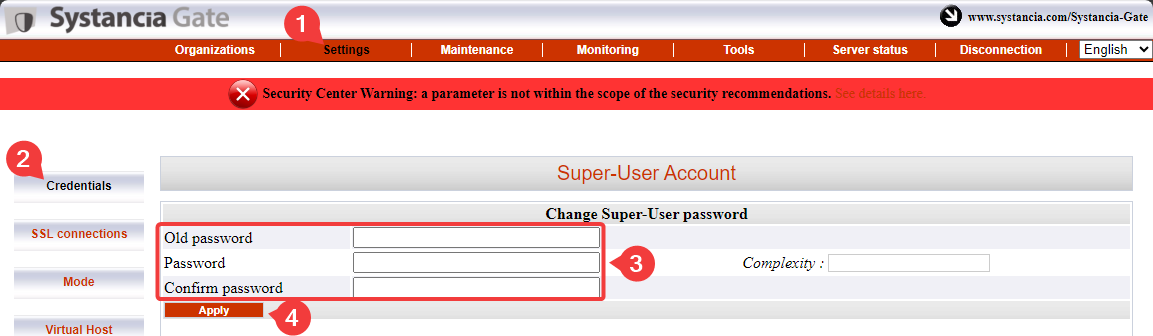
- Click on
Settings - Click on
Credentials - Enter the old password and set the new password (25 characters maximum)
- Confirm the change by clicking on the
Applybutton
Modification on the cyberelements Cleanroom system console
Access the Mediation Controller server's web interface with the URI /system.
Examples
If access to the Mediation Controller on its web IP address is 10.0.10.10, then access to the system interface will use the URL: https://10.0.10.10/system.
If access to the Mediation Controller is possible with a DNS name, for example cyberelements-cleanroom.domain.local, then access to the system interface will use the URL: https://cyberelements-cleanroom.domain.local/system.
Important !
For any changes to the password, license, or certificates (SSL Router, Watchdog, and cyberelements Cleanroom client), connect to the actual IP address for clusters (RIP_MED_WEB_MASTER or RIP_MED_WEB_SLAVE).
Once you have reached the login form, enter the following password: qsdWsefv
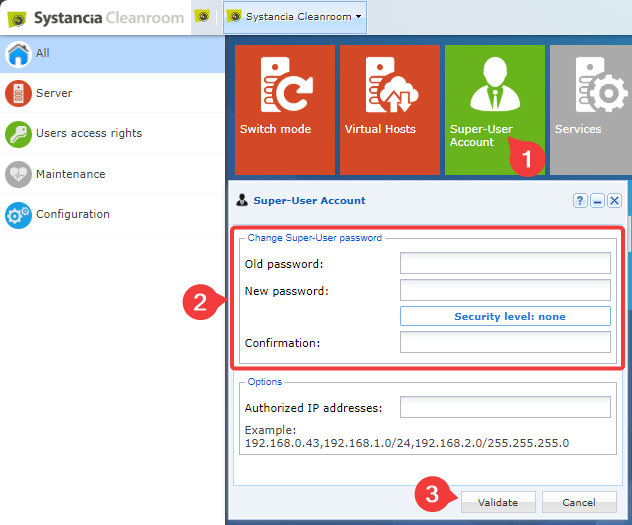
- Click on the
Super-User Accounttile - Enter the old password and set the new password
- Confirm the change by clicking on the
Validatebutton