Management of attributes¶
All object types (identities, structures, allocations, accounts) are composed of attributes. An attribute can be of different types (character string, Identity, Allocation, Structure, etc.).
Create/modify/delete an attribute¶
To access attribute management, go to the “Configuration \ Attribute Definition” menu.
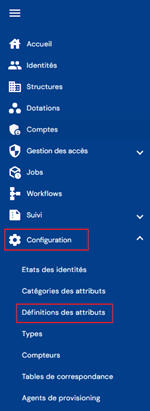
You will arrive at the first tab, “Identity”, which contains the list of existing attributes.
There are four tabs on this page:
- Identity
- Structures
- Allocations
- Account
In each tab, the attributes are listed in a table.
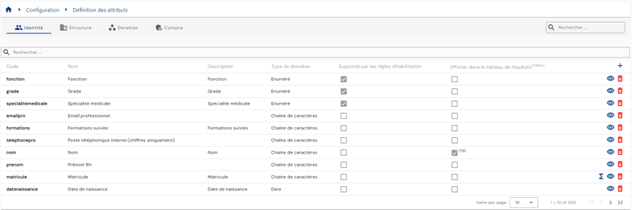
Pagination is set up to display only 10 attributes by default, but it is possible to change the number of items displayed.

A search field is available at the top right of the table. The search covers codes, names, and attribute descriptions.

To create a new attribute, click on the “ ” button.

Attribute configuration is divided into three parts:
-
General
- Personal data: check the box to identify the attribute as personal data. Only for attributes of type Identity.
- Category: Select the default category in which the attribute will be placed. You can change the category for each type of object.
- Icon name: select the icon from a list of options. Will be included in the person files. Optional.
- Icon color: option to customize the icon color.
- Code: attribute code. Must be unique for each object type, without spaces or special characters. Mandatory.
- Name: name of the attribute. Label that will be displayed in the various forms of the application. Mandatory.
- Description: field for entering a description of the attribute. Optional.
- Data type: choose from the following list. Mandatory.
- Character string
- Number
- Boolean
- Date
- Enumerated
- Identity
- Organization: option to add a structure type, but not mandatory.
- Allocation: mandatory to enter an allocation type (resource).
- Multi-valued: checkbox if the attribute can take multiple values. By default, the box is not checked.
- Structure type or Allocation type: displayed if the data type is “Allocation” or “Structure”. Enter the type of the desired object. Required only if the data type is equal to Allocation.
- Default value(s): value that will be assigned by default if no value is assigned to the attribute when creating an object. The default value is used only during creation. Optional.
- Formula type: choose a calculation method if the attribute is to be calculated from the following list:
- No formula: the attribute is not calculated.
- Formula calculated once: the attribute is calculated only when an object is created.
- Formula recalculated if necessary: the attribute is recalculated when a dependent attribute (attribute used in the formula) is modified.
- Formula recalculated with each modification: the attribute is recalculated each time the object is updated, regardless of dependencies.
- Formula: formula must be created if the “Calculation mode” field is not set to “None.” If the “Calculation mode” field is set to “None,” then this field must be empty. Refer to the section Configure a formula for calculating an attribute for formula configuration.
- Number of bevel days: integer to define the time of the bevel period of an attribute value. Used to manage authorizations given by authorization rules.
- Quick search: check the box to enable searches on the attribute in the quick search bar of the various object tables (identities, allocations, structures, accounts).
- Advanced search: check the box to enable advanced searches, either via search forms.
- Supported by authorization rules: check the box to include the attribute in the filtering criteria for authorization rules.
- Homonym: check the box if you want the attribute to be compared when identities are created manually.
-
Display format
-
Display index: default display index in the various forms (creation, consultation, modification).
-
Display format: enter a value from a dynamic list that is constructed according to the data type:
- Character string:
- Default display format: simple character string
- Link display format: character string converted to a link
- Boolean:
- Default display format: 1 or 0 depending on the value.
- Button display format: allows you to define an icon and label depending on the value of the attribute. Allows you to perform actions on the button.
- Date:
- Choose the format from the list: Short date, Medium date, Long date, or Custom (format to be defined using the characters d, M, and y to define days, months, and years, respectively).
- Person/allocation/structure
- Single string
- Link to object (with logo)
- Character string:
-
Display in results table: checkbox to display the attribute value in the table listing the corresponding objects.
-
Display index in results table: display index in the object results tables
-
Display as information: Select “Displayed” to display the attribute in the box at the top right of the identities.
- Displayed
- Hidden
By default, the displayed attributes are:
 1
 2
 3
 4
 5
 6
 7
 8
 9
10
11
12
13
14
15
16
17
18
19
20
21
22
23
24
25
26
27
+ Display name + UID * Display for consultation + Displayed + Hidden * Display size in view mode: enter the percentage of the line to be allocated for displaying the attribute in view mode. Examples: + 100: the attribute will be displayed on the entire line + 50: allows 2 attributes to be displayed on one line * Display during creation + Displayed + Hidden * Display size in view mode: enter the percentage of lines to be allocated for displaying the attribute in creation mode. * Display in edition mode + Displayed: displayed and editable + Read-only: displayed but not editable + Hidden * Display size in view mode: enter the percentage of the line to be allocated for displaying the attribute in view mode. -
-
Validations
- Required: check if the attribute is mandatory in creation or modification mode.
- Depending on the data type, it is possible to configure controls:
- Character string:
- Minimum length
- Maximum length
- Data model: option to choose Mail or Custom. With the second option, a regular expression must be written.
- Number:
- Minimum value
- Maximum value
- Character string:
- Since SP3 of cyberelements Identity 7.0, a uniqueness option has been added:
- None: the uniqueness option is not enabled (default value);
- By type: the uniqueness option is enabled. The values checked will be filtered by object type;
- Complete: the uniqueness option is enabled and does not take the object type into account.
!!! example “Example” - If the uniqueness option is set to “By type,” an “Employee” identity may have the same value as an ‘External’ identity for the same attribute. Two “Employee” identities cannot have the same attribute value. - If the uniqueness option is set to “Complete,” an ‘Employee’ identity cannot have the same value as an “External” identity for the same attribute.
If an attribute is calculated, then it is necessary to specify a formula to be applied in the event that the first value calculated using the main formula returns an existing value. It is recommended to use the keyword §INDEX_DOUBLON§ in the second formula to ensure the uniqueness of the value.
To view and modify an attribute, click on the icon “ ” located to the right in the corresponding table row.

You can switch to edit mode directly from the attribute viewing page.
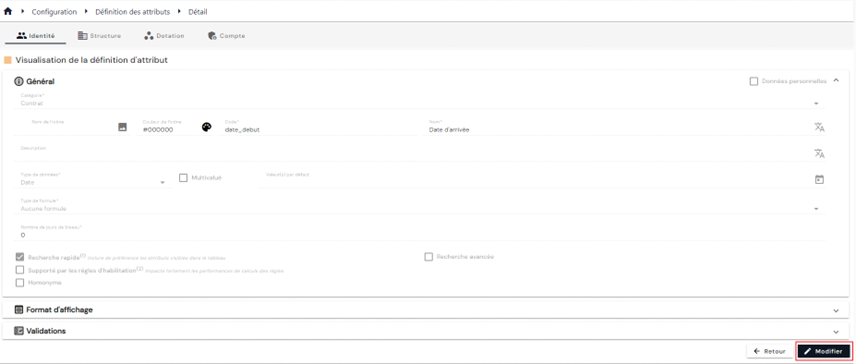
In edit mode, all fields can be modified.
Actions on buttons in edit or create mode:
- Cancel: cancels the current entry and returns to the attribute list page.
- Save: Validate the form and switch the page to view mode
- Save and quit: Validate the form and return to the attribute list page
To delete an attribute, click on the icon “ ” located to the right of the corresponding table row.

A confirmation message will appear before the attribute is deleted.
Warning: it is not possible to delete an attribute as long as it is linked to objects.
Populating an enumerated attribute¶
An enumerated attribute is an attribute with a predetermined list of values. The attribute value must be present in the list in order to be assigned.
An enumerated attribute is populated either via the interface or via an upstream provisioning connector.
To populate an enumerated attribute via the interface, open the attribute configuration page in view mode.
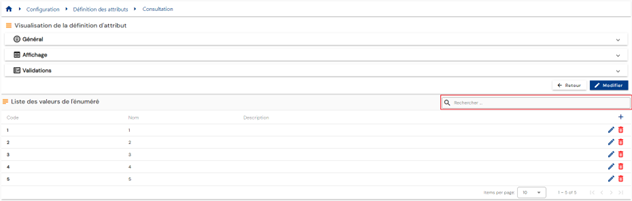
The list of enumerated values is preloaded in a table without any filters applied and displayed at the bottom of the page.
Pagination is implemented to display only 10 values.
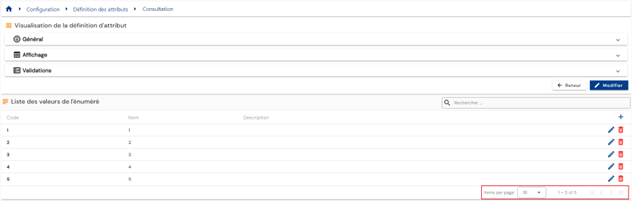
A search field is available at the top right of the table. The search covers the codes, names, or descriptions of the enumerated values, i.e., the fields displayed in the table.
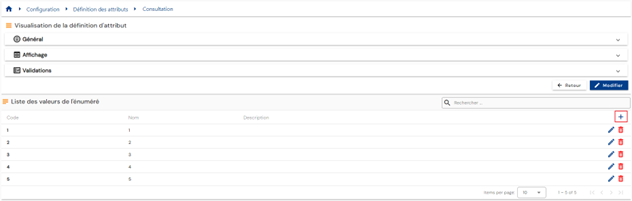
To add a new value to the enumerated attribute list, click on the “” button located in the “Enumerated value list” table.
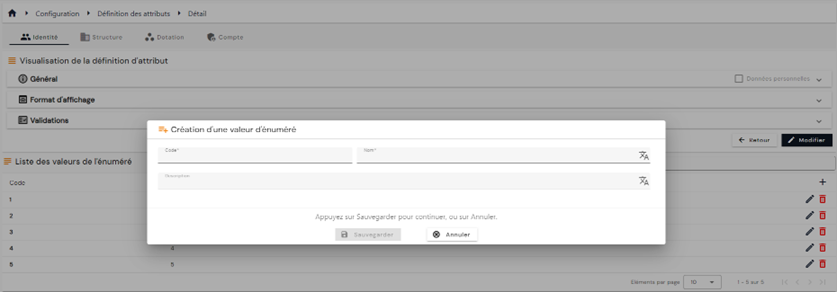
Enter the enumerator's information:
- Code: code of the enumerated value. Must be unique, without spaces or special characters. Mandatory.
- Name: name of the enumerated. Label that will be displayed in the various forms of the application. Mandatory.
- Description: field that allows you to enter a description of the enumerated item. Optional.
To modify an enumeration, click on the “ ” icon located to the right in the corresponding table row.
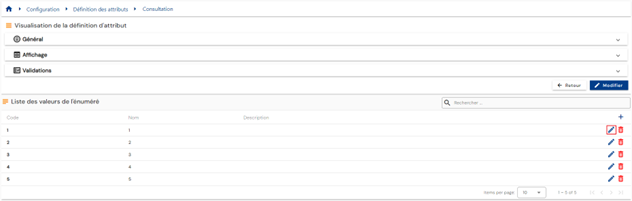
All fields can be modified.
Actions on buttons in edit or create mode:
- Cancel: cancels the current entry and returns to the attribute viewing page.
- Save: Validate the form and add the value to the enumeration list table
To delete an entry, click on the icon “” located to the right of the corresponding table row.
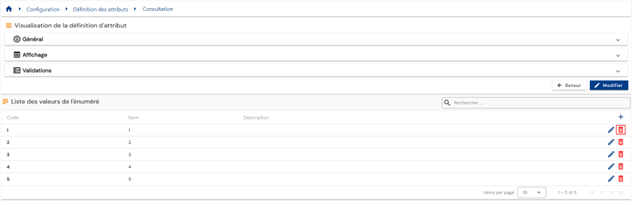
A confirmation message will appear before the enumeration is deleted.
Warning: it is not possible to delete an enumerated value as long as it is assigned to an attribute linked to an object (identity, structure, provisioning, or account).
To populate an enumerated attribute via the Systancia Identity Provisioning (SIP) engine, you must create an upstream provisioning connector: from an external authoritative source, enumeration values that meet the synchronization rules will be created, updated, and deleted in Systancia Identity according to the rules defined in the import rules.
The provisioning sequence must include at least the following elements:
- An export of the authoritative repository
- An export of the Identity repository of type “ENUMERATIONS”
- A synchronization rule
- An import rule in the Identity repository of type “ENUMERATIONS”
Please refer to the Automatic Provisioning Connector Management page to create a connector.
Configure a formula for calculating an attribute¶
The formula for calculating an attribute corresponds to a SELECT query that will be executed in the database. The SELECT operation must not be included in the formula.
For attributes linked to the identity object type, queries will be performed on tables containing identity data.
For attributes linked to the structure object type, queries will be performed on tables containing structure data.
For attributes linked to the allocation object type, queries will be performed on tables containing allocation data.
For attributes linked to the account object type, queries will be performed on tables containing account data.
To refer to certain objects, keywords must be used.
Unless otherwise specified, the following keywords and their variations can be used in the attributes of all object types (identity, structure, allocation, account):
-
§ATTRIBUTE§
-
§ATTRIBUTE§[attribute_code]§: retrieves the value of the attribute whose code is passed as the second parameter.
-
§ATTRIBUTE§IS_MASTER§: This variation can only be used for attributes of Identity type objects. Retrieves the position of the primary identity in a reconciliation chain. The possible values are as follows:
- 0: if the identity is secondary in a reconciliation chain
- 1: if the identity is primary in a reconciliation chain
- 2: if the identity is not in any reconciliation chain
-
§ATTRIBUTE§[primary_attribute_code].[secondary_attribute_code]§: allows you to retrieve the value of the (secondary) attribute linked to the object defined by the primary_attribute_code. This can only be used for (primary) attributes of the Identity, Structure, or Allocation type, depending on the type of object that uses the formula:
- An identity can be linked to attributes of the Identity, Structure, and Allocation type.
- A Structure can be linked to attributes of the Identity and Allocation type.
- An allocation can be linked to attributes of the Identity and Structure type.
- An account can be linked to attributes of type Identity, Structure, and Allocation.
It is also possible to use this variation to retrieve the values of the code, name, or description of enumerated attributes. In this case, the value of [secondary_attribute_code] must be:
1
2
3
4
5
+ Code to retrieve the enumeration code + Name to retrieve the enumeration name + Description to retrieve the description of the enumeration * §ATTRIBUTE§[attribute_code].parent§: Variation that is only used for structure type attributes. It allows you to retrieve the parent structure of the structure that is passed as a parameter. It is possible to multiply the use of “.parent” if you want to go up several levels. -
-
§ACCOUNT§: keyword that can only be used in attributes linked to the identity object type
- §ACCOUNT§[account_type_code]§: allows you to retrieve the account login, linked to the identity on which the formula is executed, and whose code type is passed as the second parameter.
Example: §ACCOUNT§Account_Type_AD§
-
§COUNTER§
- §COUNTER§[counter_code]§: retrieves the value of the counter, incremented by one unit, whose code is passed as the second parameter.
Example: §COUNTER§External_ID_Number§
-
§CONTEXT§
- §CONTEXT§Code§: allows you to retrieve the code for the current context.
Example:
1
2
3
4
CASE §CONTEXT§Code§ WHEN ‘Standard’ THEN ‘Accès ouvert’ WHEN ‘Plan blanc’ THEN ‘Accès limité’ ELSE ‘Accès fermé’ END -
§ENUM§: keyword that allows you to populate an enumeration type attribute from its code.
- §ENUM§[enum_type_attribute_code]§[secondary_attribute_code]§: allows you to populate the enumeration type attribute whose code is equal to the [enum_type_attribute_code] parameter from the value of the attribute whose code is passed as the second parameter [secondary_attribute_code]. This means that the second attribute has the code of an enumeration as its value.
This variation is often used when the code of an enumeration is retrieved from a cross-reference table.
Example: In the attribute with the code “Code_grade_table,” the code for the corresponding grade enumeration is calculated from a cross-reference table. It has the value GRADE_MANAGER.
I have an attribute with the code ‘grade’, of type enumeration, in which I want to assign the value that corresponds to the code calculated in the ‘Code_grade_table’ attribute.
My formula will be: §ENUM§grade§Code_grade_table§
- §ENUM§[enum_type_attribute_code].[enumeration_code]§: allows you to provision the enumeration type attribute whose code is equal to the [enum_type_attribute_code] parameter with the enumeration code passed in the second parameter [enumeration_code].
This variation is often used when the value of the enumeration is calculated based on the value of another attribute.
Example: I have an attribute with the code “access_type”, which is an enumeration type with the following values:
- Code = accès_intranet / Valeur = Intranet
- Code = accès_externe / Valeur = Externe
My attribute must take the value ‘Intranet’ when the person type is equal to ‘agent’ and the value ‘External’ when the person type is equal to ‘service provider’.
My formula will be:
1
2
3
4
CASE §ATTRIBUT§type_personne_enum.code§ WHEN ‘agent’ THEN §ENUM§type_accès.accès_intranet§ WHEN ‘prestataire’ THEN §ENUM§type_accès.accès_externe§ ELSE ‘’ END -
§IDENTITY§
- §IDENTITY§uid_identity§attribute_code§: retrieves the value of the attribute passed as the second parameter of the identity whose UID is specified in the first parameter. The UID must be passed as a hard-coded value.
-
§MAPPING§: keyword that retrieves values from mapping tables based on a given key.
- §MAPPING§[mapping_table_code].[table_key_code]§: retrieves the value or values in the table with the code [mapping_table_code] and the key value passed in the second parameter [table_key_code].
This variation is often used when the key used differs depending on the value of another attribute.
- §MAPPING§[mapping_table_code]§[secondary_attribute_code]§: retrieves the value or values in the table with code [mapping_table_code] from the value of the attribute whose code is passed in the second parameter [secondary_attribute_code]. This means that the second attribute has a key from an enumeration table as its value.
In this case, if the secondary attribute is of type identity, structure, or allocation, it is possible to extend the variation as follows: §MAPPING§[cross-reference_table_code]§[secondary_attribute_code].[tertiary_attribute_code]§. The value of the [tertiary_attribute_code] attribute linked to the [secondary_attribute_code] attribute is retrieved.
This variation is often used when the key of an enumeration table is populated or calculated in an attribute.
-
§PERSON_STATE§: keyword that can only be used in the Status system attribute (code=person_status), which allows a value to be assigned to this attribute.
- §PERSON_STATE§[status_code]§: assigns the value whose code is passed as the second parameter.
The following keywords and their variations can be used in attributes related to the account object type:
-
§RIGHTS§
- §RIGHTS§[right_parameter_code]§: allows you to retrieve a value, code, provisioning status, theoretical status, etc. (parameter passed as the second parameter, [right_parameter_code]) for all authorizations linked to the account. This keyword must be used in a multi-valued attribute.
- §RIGHTS. [right_code]§[right_parameter_code]§: allows you to retrieve a value, code, provisioning status, theoretical status, etc. (parameter passed as the third parameter, [right_parameter_code]) for the authorization whose code is defined in the second parameter, [right_code]. The value can be single-valued or multi-valued.
-
§ROLES§
- §ROLES§[role_parameter_code]$: retrieves the name or code (parameter passed as the second parameter, [role_parameter_code]) of all roles linked to the account. This keyword must be used in a multi-valued attribute.
- §ROLES.[role_code]§[role_parameter_code]§: retrieves the name or code (parameter passed as the third parameter, [role_parameter_code]) of the role whose code is defined in the second parameter, [role_code].
-
§OWNER§ / §IDENTITIES§
- §OWNER§[attribute_code]§: retrieves the value of an attribute whose code is passed as the second parameter ([attribute_code]) of the primary person in the reconciliation chain, whether or not they are linked to the account.
- §IDENTITIES§[attribute_code]§: retrieves the value of an attribute whose code is passed as the second parameter ([attribute_code]) for all identities linked to the account, i.e., both primary and secondary.
If the attribute is of the identity, structure, or allocation type, it is possible to extend the variation as follows: §[OWNER/IDENTITIES]§[attribute_code].[secondary_attribute_code]. The value of the [secondary_attribute_code] attribute linked to the [attribute_code] attribute is retrieved.
-
§CONCAT§ / §MIN§ / §MAX§: keywords that can only be used with the keywords §OWNER§ / §IDENTITIES§.
- §CONCAT§[OWNER/IDENTITIES]§[attribute_code].[secondary_attribute_code]§[separator]§: retrieves a character string whose value is a concatenation of the value of the attribute passed in the 3rd and 4th parameters ([attribute_code].[secondary_attribute_code]) for all identities identified by the second parameter. Each value is separated by a character specified in the fifth parameter.
- §MIN§[OWNER/IDENTITIES]§[attribute_code]§: retrieves the highest value among the values of the attribute passed as the third parameter ([attribute_code]) for all identities identified by the second parameter.
- §MAX§[OWNER/IDENTITIES]§[attribute_code]§: retrieves the highest value among the values of the attribute passed as the third parameter ([attribute_code]) for all identities identified by the second parameter.
-
§PASSWORD§
- §PASSWORD§[number]§[lowercase]§[uppercase]§[special]§[special_characters_list]§[number_of_characters]§: allows you to generate random passwords for accounts.
- [number]: allows you to define whether the password must contain at least one number. The value 1 enables the constraint. To disable the constraint, enter the value 0.
- [lowercase]: allows you to define whether the password must contain at least one lowercase letter. The value 1 enables the constraint. To disable the constraint, enter the value 0.
- [uppercase]: allows you to define whether the password must contain at least one uppercase letter. The value 1 enables the constraint. To disable the constraint, enter the value 0.
- [special]: allows you to define whether the password must contain at least one special character. The value 1 enables the constraint. To disable the constraint, enter the value 0.
- [special_characters_list]: allows you to specify the special characters allowed from the following list:
!#$%&()*+,./:;<>?@[]^_|~. - [number_of_characters]: defines the number of characters in the password.
!!! example "Example"
§PASSWORD§1§1§1§1§!#$%&()*+§8§This line defines an 8-character password requiring at least one number, at least one lowercase letter, at least one uppercase letter, and at least one special character from the following list:!#$%&()*+ - §PASSWORD§[number]§[lowercase]§[uppercase]§[special]§[special_characters_list]§[number_of_characters]§: allows you to generate random passwords for accounts.
-
§INDEX_DUPLICATE§
- §INDEX_DUPLICATE§: adds an index to the location where the keyword is positioned in the attribute value.
!!! warning “Warning”
This keyword can only be used for calculated attributes and only when the uniqueness option is enabled. -
§UNION§
- §UNION§<attribute1>|<attribute2>|...§: allows you to concatenate values from several attributes into another attribute.
- §UNION§<attribute1>|<attribute2>|...§<value1>|<value2>|...§: allows you to concatenate values from several attributes into another attribute by specifying fixed values.
- The hard-coded values in the formula can take the following form:
- For Boolean attributes: true or false
- §UNION§active_person§false§
- For date attributes: the format
SQL_DATE_FORMAT_SHORTin the dbo.CONFIGURATION table must be used (default “yyyy-MM-dd”)- §UNION§start_date|end_date§2025-05-15§
- For attributes of type, structure, resources, or enumerated: the ID must be specified
- §UNION§manager§1885|1886§
- For attributes of type character string: it is not possible to include spaces in character strings, nor to use the characters
|or§. The special characters allowed are: !#$%&'()*+,./:;<>?@[]^_{}~- §UNION§firstname§Jean-Pierre|Marie§
- For Boolean attributes: true or false
- The hard-coded values in the formula can take the following form:
-
§RANDOM§
- §RANDOM.[object_type]§[code]§: allows you to randomly select a value from a list of values in an object of type
Table de correspondance,énumérationsorattributs multivalués.- [object_type] allows you to specify the type of object; it can take the following values:
- MAPPING for mapping tables
- ENUM for enumerated attributes
- ATTRIBUTE for a multi-valued attribute
- [code] allows you to specify the code of the desired attribute or object
- [object_type] allows you to specify the type of object; it can take the following values:
- §RANDOM.[object_type]§[code]§: allows you to randomly select a value from a list of values in an object of type