Assign/unassign an allocation (resource) to an identity
Add/remove an allocation to an identity via the interface
From the identity modification page, if the identity type has an allocation attribute, then it is possible to assign an existing allocation to it or remove an allocation that is already linked.
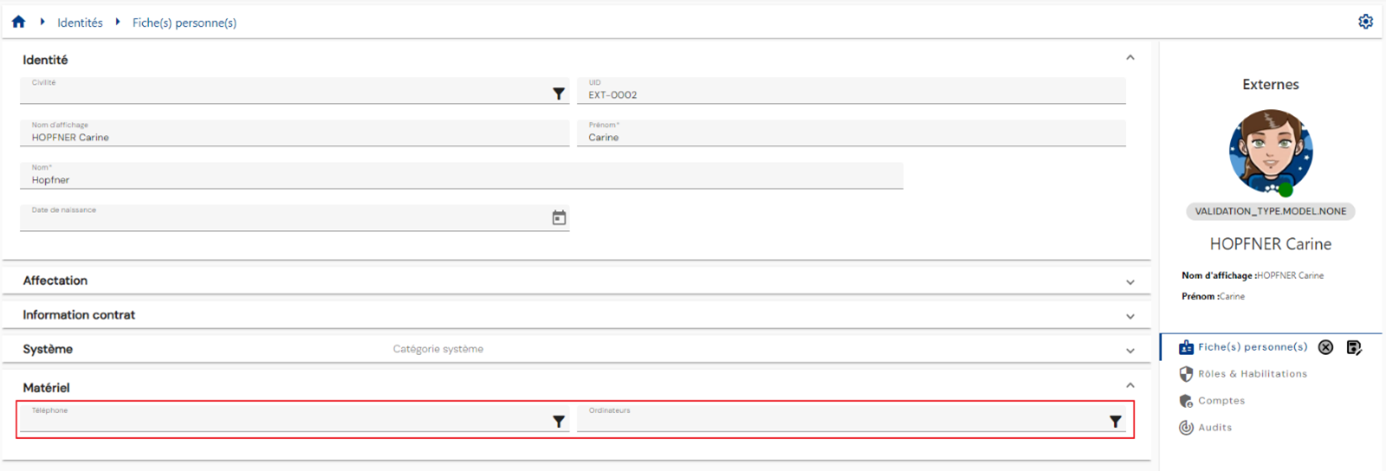
Depending on the configuration of the attribute, it can be single or multi-valued.
The allocation must be created before it can be added to an identity.
A pop-up window with the list of preloaded allocations opens so that you can select the allocation(s). You can search for the desired allocation using the quick search bar or advanced search.
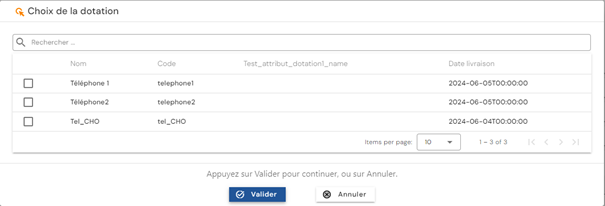
Click on the “Validate” button to validate and assign the resources to the person.
Assign/unassign an allocation to an identity via SIP
Adding or removing a resource-identity link involves modifying an identity. The resource-type attribute is modified to add or remove values.
To link an allocation (resource) to an identity via the Systancia Identity Provisioning (SIP) engine, you need to create an upstream provisioning connector: from an external authoritative source, identity-resource links that meet the synchronization rules will be added and removed in Systancia Identity according to the rules defined in the import rules.
The provisioning sequence must include at least the following elements:
- An export of the authoritative repository with identity-resource links
- An export of the Identity repository of type “USER”
- A synchronization rule
- An import rule in the Identity repository of type “USER”
Please refer to the Automatic Provisioning Connector Management page to create a connector.